prometheus 磁盘布局

采集到的数据每两个小时形成一个block。每个block由一个目录组成,并存放在data路径下。该目录包含一个包含该时间窗口的所有时间序列样本的块子目录、一个元数据文件和一个索引文件(将metric_name和label索引到目录下的时间序列)。 chunks 目录中的样本默认组合成一个或多个段文件,每个段文件最大为 512MB。 当通过 API 删除系列时,删除记录存储在单独的 tombstone 文件中(而不是立即从块段中删除数据)。

当前正在写入的块保存在内存中,没有完全持久化。通过WAL日志来防止崩溃丢失数据。预写日志分为数节(segments)保存在wal文件夹中。这些文件包含尚未压缩的原始数据; 因此它们比常规块文件大得多。 Prometheus 将至少保留三个预写日志文件。在高流量下,会保留三个以上的 WAL 文件,以便保留至少两个小时的原始数据。

1
2
3
4
5
6
7
8
9
10
11
12
13
14
15
16
17
18
19
20
21
22
23
./data
├── 01BKGV7JBM69T2G1BGBGM6KB12
│ └── meta.json
├── 01BKGTZQ1SYQJTR4PB43C8PD98
│ ├── chunks
│ │ └── 000001
│ ├── tombstones
│ ├── index
│ └── meta.json
├── 01BKGTZQ1HHWHV8FBJXW1Y3W0K
│ └── meta.json
├── 01BKGV7JC0RY8A6MACW02A2PJD
│ ├── chunks
│ │ └── 000001
│ ├── tombstones
│ ├── index
│ └── meta.json
├── chunks_head
│ └── 000001
└── wal
├── 000000002
└── checkpoint.00000001
└── 00000000

prometheus概念

  • Label: 标签,string格式的kv组合
  • series: 时间序列,label的组合
  • chunk: 时间,value的数据

prometheus索引格式

1
2
3
4
5
6
7
8
9
10
11
12
13
14
15
16
17
18
19
┌────────────────────────────┬─────────────────────┐
│ magic(0xBAAAD700) <4b> │ version(1) <1 byte> │
├────────────────────────────┴─────────────────────┤
│ ┌──────────────────────────────────────────────┐ │
│ │ Symbol Table │ │
│ ├──────────────────────────────────────────────┤ │
│ │ Series │ │
│ ├──────────────────────────────────────────────┤ │
│ │ Postings 1 │ │
│ ├──────────────────────────────────────────────┤ │
│ │ ... │ │
│ ├──────────────────────────────────────────────┤ │
│ │ Postings N │ │
│ ├──────────────────────────────────────────────┤ │
│ │ Postings Offset Table │ │
│ ├──────────────────────────────────────────────┤ │
│ │ TOC │ │
│ └──────────────────────────────────────────────┘ │
└──────────────────────────────────────────────────┘

写入索引时,可以在上面列出的主要部分之间添加任意数量的0字节作为填充。顺序扫描文件时,必须跳过部分间的任意0字节。

下面描述的大部分部分都以 len 字段开头。 它总是指定就在尾随 CRC32 校验和之前的字节数。 校验和就计算这些字节的校验和(不包含len字段)

符号表

符号表包含已存储序列的标签对中出现的重复数据删除字符串的排序列表。 它们可以从后续部分中引用,并显着减少总索引大小。

该部分包含一系列字符串entry,每个entry都以字符串的原始字节长度为前缀。 所有字符串均采用 utf-8 编码。 字符串由顺序索引引用。 字符串按字典顺序升序排序。

1
2
3
4
5
6
7
8
9
10
11
12
13
┌────────────────────┬─────────────────────┐
│ len <4b> │ #symbols <4b> │
├────────────────────┴─────────────────────┤
│ ┌──────────────────────┬───────────────┐ │
│ │ len(str_1) <uvarint> │ str_1 <bytes> │ │
│ ├──────────────────────┴───────────────┤ │
│ │ . . . │ │
│ ├──────────────────────┬───────────────┤ │
│ │ len(str_n) <uvarint> │ str_n <bytes> │ │
│ └──────────────────────┴───────────────┘ │
├──────────────────────────────────────────┤
│ CRC32 <4b> │
└──────────────────────────────────────────┘

序列 series

保存一个具体的时间序列,其中包含系列的label集合和block中的chunks。

每个series都是16字节对齐。series的id为偏移量除以16。series ID 的排序列表也就是series label的字典排序列表。

1
2
3
4
5
6
7
8
9
┌───────────────────────────────────────┐
│ ┌───────────────────────────────────┐ │
│ │ series_1 │ │
│ ├───────────────────────────────────┤ │
│ │ . . . │ │
│ ├───────────────────────────────────┤ │
│ │ series_n │ │
│ └───────────────────────────────────┘ │
└───────────────────────────────────────┘

每一个series先保存label的数量,然后是包含label键值对的引用。 标签对按字典顺序排序。然后是series涉及的索引块的个数,然后是一系列元数据条目,其中包含块的最小 (mint) 和最大 (maxt) 时间戳以及对其在块文件中位置的引用。mint 是第一个样本的时间,maxt 是块中最后一个样本的时间。 在索引中保存时间范围数据, 允许按照时间范围删除数据时,如果时间范围匹配,不需要直接访问时间数据。

空间大小优化: 第一个块的 mint 被存储,它的 maxt 被存储为一个增量,并且 mintmaxt 被编码为后续块的前一个时间的增量。 类似的,第一个chunk的引用被存储,下一个引用被存储为前一个chunk的增量。

1
2
3
4
5
6
7
8
9
10
11
12
13
14
15
16
17
18
19
20
21
22
23
24
25
26
27
28
29
30
31
32
33
34
┌──────────────────────────────────────────────────────────────────────────┐
│ len <uvarint> │
├──────────────────────────────────────────────────────────────────────────┤
│ ┌──────────────────────────────────────────────────────────────────────┐ │
│ │ labels count <uvarint64> │ │
│ ├──────────────────────────────────────────────────────────────────────┤ │
│ │ ┌────────────────────────────────────────────┐ │ │
│ │ │ ref(l_i.name) <uvarint32> │ │ │
│ │ ├────────────────────────────────────────────┤ │ │
│ │ │ ref(l_i.value) <uvarint32> │ │ │
│ │ └────────────────────────────────────────────┘ │ │
│ │ ... │ │
│ ├──────────────────────────────────────────────────────────────────────┤ │
│ │ chunks count <uvarint64> │ │
│ ├──────────────────────────────────────────────────────────────────────┤ │
│ │ ┌────────────────────────────────────────────┐ │ │
│ │ │ c_0.mint <varint64> │ │ │
│ │ ├────────────────────────────────────────────┤ │ │
│ │ │ c_0.maxt - c_0.mint <uvarint64> │ │ │
│ │ ├────────────────────────────────────────────┤ │ │
│ │ │ ref(c_0.data) <uvarint64> │ │ │
│ │ └────────────────────────────────────────────┘ │ │
│ │ ┌────────────────────────────────────────────┐ │ │
│ │ │ c_i.mint - c_i-1.maxt <uvarint64> │ │ │
│ │ ├────────────────────────────────────────────┤ │ │
│ │ │ c_i.maxt - c_i.mint <uvarint64> │ │ │
│ │ ├────────────────────────────────────────────┤ │ │
│ │ │ ref(c_i.data) - ref(c_i-1.data) <varint64> │ │ │
│ │ └────────────────────────────────────────────┘ │ │
│ │ ... │ │
│ └──────────────────────────────────────────────────────────────────────┘ │
├──────────────────────────────────────────────────────────────────────────┤
│ CRC32 <4b> │
└──────────────────────────────────────────────────────────────────────────┘

Posting

Posting这一节存放着关于series引用的单调递增列表,简单来说就是存放id和时间序列的对应关系

1
2
3
4
5
6
7
8
9
10
11
12
13
┌────────────────────┬────────────────────┐
│ len <4b> │ #entries <4b> │
├────────────────────┴────────────────────┤
│ ┌─────────────────────────────────────┐ │
│ │ ref(series_1) <4b> │ │
│ ├─────────────────────────────────────┤ │
│ │ ... │ │
│ ├─────────────────────────────────────┤ │
│ │ ref(series_n) <4b> │ │
│ └─────────────────────────────────────┘ │
├─────────────────────────────────────────┤
│ CRC32 <4b> │
└─────────────────────────────────────────┘

Posting sections的顺序由postings offset table决定。

Posting Offset Table

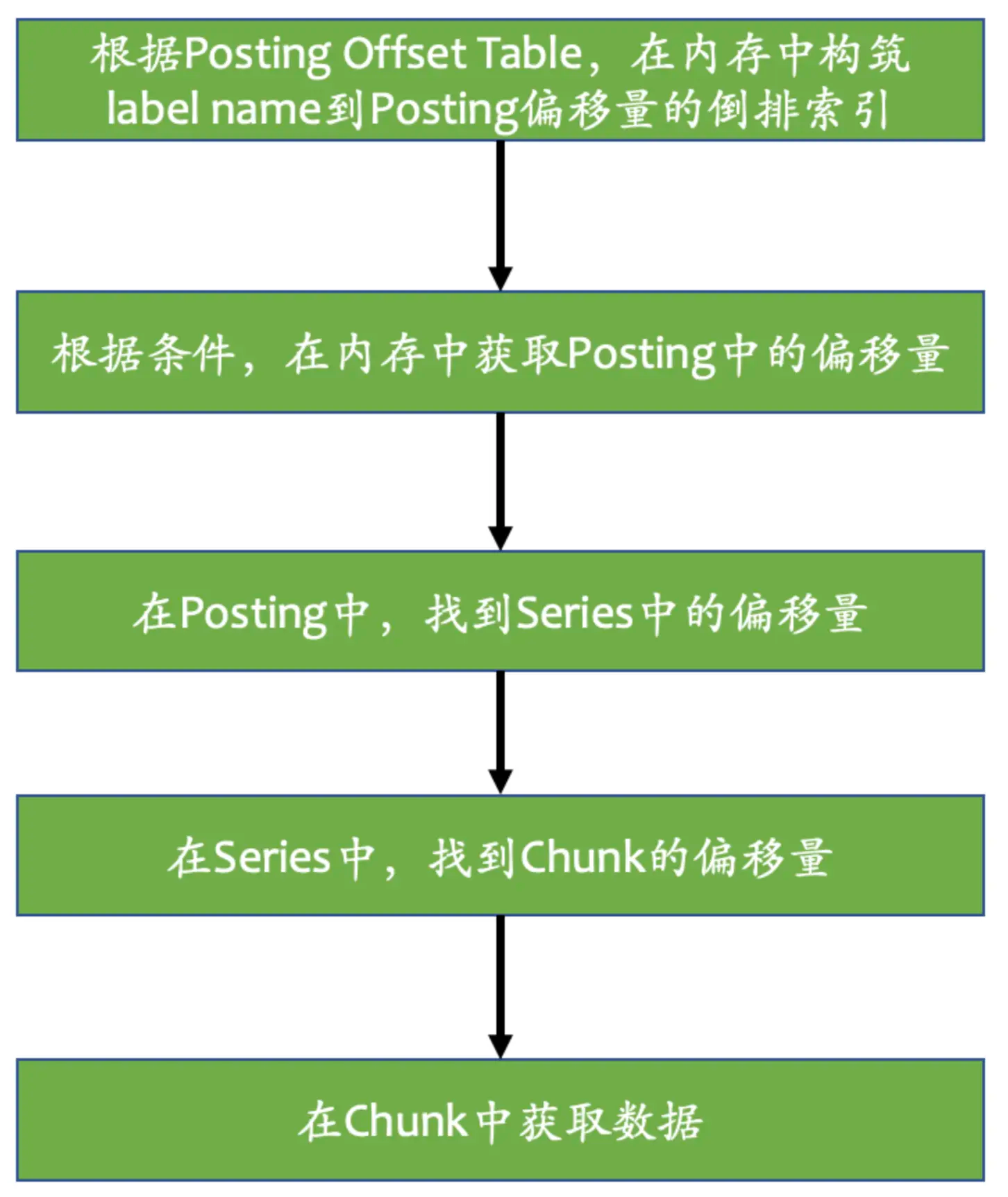
postings offset table包含着一系列posting offset entry,根据label的名称和值排序。每一个posting offset entry存放着label的键值对以及在posting sections中其series列表的偏移量。用来跟踪posting sections。当index文件加载时,它们将部分加载到内存中。

1
2
3
4
5
6
7
8
9
10
11
12
13
14
15
16
┌─────────────────────┬──────────────────────┐
│ len <4b> │ #entries <4b> │
├─────────────────────┴──────────────────────┤
│ ┌────────────────────────────────────────┐ │
│ │ n = 2 <1b> │ │
│ ├──────────────────────┬─────────────────┤ │
│ │ len(name) <uvarint> │ name <bytes> │ │
│ ├──────────────────────┼─────────────────┤ │
│ │ len(value) <uvarint> │ value <bytes> │ │
│ ├──────────────────────┴─────────────────┤ │
│ │ offset <uvarint64> │ │
│ └────────────────────────────────────────┘ │
│ . . . │
├────────────────────────────────────────────┤
│ CRC32 <4b> │
└────────────────────────────────────────────┘

TOC

table of contents是整个索引的入口点,并指向文件中的各个部分。 如果引用为零,则表示相应的部分不存在,查找时应返回空结果。

1
2
3
4
5
6
7
8
9
10
11
12
13
14
15
┌─────────────────────────────────────────┐
│ ref(symbols) <8b> │
├─────────────────────────────────────────┤
│ ref(series) <8b> │
├─────────────────────────────────────────┤
│ ref(label indices start) <8b> │
├─────────────────────────────────────────┤
│ ref(label offset table) <8b> │
├─────────────────────────────────────────┤
│ ref(postings start) <8b> │
├─────────────────────────────────────────┤
│ ref(postings offset table) <8b> │
├─────────────────────────────────────────┤
│ CRC32 <4b> │
└─────────────────────────────────────────┘

chunks 磁盘格式

chunks文件创建在block中的chunks/目录中。 每个段文件的最大大小为 512MB。
文件中的chunk由uint64的索引组织,索引低四位为文件内偏移,高四位为段序列号。

1
2
3
4
5
6
7
8
9
10
11
12
13
14
15
┌──────────────────────────────┐
│ magic(0x85BD40DD) <4 byte> │
├──────────────────────────────┤
│ version(1) <1 byte> │
├──────────────────────────────┤
│ padding(0) <3 byte> │
├──────────────────────────────┤
│ ┌──────────────────────────┐ │
│ │ Chunk 1 │ │
│ ├──────────────────────────┤ │
│ │ ... │ │
│ ├──────────────────────────┤ │
│ │ Chunk N │ │
│ └──────────────────────────┘ │
└──────────────────────────────┘

chunks中的Chunk格式

1
2
3
┌───────────────┬───────────────────┬──────────────┬────────────────┐
│ len <uvarint> │ encoding <1 byte> │ data <bytes> │ CRC32 <4 byte> │
└───────────────┴───────────────────┴──────────────┴────────────────┘

查询数据

code

查询的prometheus方法签名

1
Select(sortSeries bool, hints *SelectHints, matchers ...*labels.Matcher) SeriesSet

支持从block中,remote等各种地方查询获取数据

prometheus会在内存中维护一个数据结构

1
2
3
// Map of LabelName to a list of some LabelValues's position in the offset table.
// The first and last values for each name are always present.
postings map[string][]postingOffset

在内存中,保留每个label name,并且每n个保存label值,降低内存的占用。但是第一个和最后一个值总是保存在内存中。

查询数据流程

prometheus-tsdb-index

参考资料

物联网是现在比较热门的软件领域,众多云厂商都有自己的物联网平台,而物联网平台其中一个核心的模块就是Mqtt网关。

使用Netty搭建高性能服务器是一个常见的选择,Netty自带Mqtt的编解码,我们很快就可以在Netty服务器中插入Mqtt的编解码handler,由netty已经编写好的模块帮助我们做mqtt的编解码,我们仅需自己处理mqtt协议业务的处理,如登录,订阅分发等。

NettyServer使用MqttHandler编解码

1
2
3
4
5
6
7
8
9
10
11
12
13
14
15
16
17
18
19
20
21
22
23
24
25
26
27
28
29
30
31
32
33
34
35
36
37
38
39
40
41
42
43
44
45
46
47
48
49
50
51
52
53
54
package com.github.hezhangjian.demo.iot.mqtt.broker;

import io.netty.bootstrap.ServerBootstrap;
import io.netty.channel.ChannelFuture;
import io.netty.channel.ChannelInitializer;
import io.netty.channel.ChannelOption;
import io.netty.channel.ChannelPipeline;
import io.netty.channel.EventLoopGroup;
import io.netty.channel.nio.NioEventLoopGroup;
import io.netty.channel.socket.SocketChannel;
import io.netty.channel.socket.nio.NioServerSocketChannel;
import io.netty.handler.codec.mqtt.MqttDecoder;
import io.netty.handler.codec.mqtt.MqttEncoder;
import io.netty.handler.logging.LogLevel;
import io.netty.handler.logging.LoggingHandler;
import lombok.extern.slf4j.Slf4j;

/**
* @author hezhangjian
*/
@Slf4j
public class MqttServer {

public static void main(String[] args) throws Exception {
EventLoopGroup bossGroup = new NioEventLoopGroup(1);
EventLoopGroup workerGroup = new NioEventLoopGroup();
try {
ServerBootstrap b = new ServerBootstrap();
b.group(bossGroup, workerGroup)
.channel(NioServerSocketChannel.class)
.option(ChannelOption.SO_BACKLOG, 100)
.handler(new LoggingHandler(LogLevel.INFO))
.childHandler(new ChannelInitializer<SocketChannel>() {
@Override
public void initChannel(SocketChannel ch) throws Exception {
ChannelPipeline p = ch.pipeline();
p.addLast(new MqttDecoder());
p.addLast(MqttEncoder.INSTANCE);
}
});

// Start the server.
ChannelFuture f = b.bind(1883).sync();

// Wait until the server socket is closed.
f.channel().closeFuture().sync();
} finally {
// Shut down all event loops to terminate all threads.
bossGroup.shutdownGracefully();
workerGroup.shutdownGracefully();
}
}

}

客户端采用eclipse mqtt client

1
2
3
4
5
6
7
8
9
10
11
12
13
14
15
16
17
18
19
20
21
22
23
24
25
26
27
28
29
30
31
32
33
34
35
36
37
38
39
40
41
42
43
44
45
46
47
48
49
package com.github.hezhangjian.demo.mqtt.client;

import lombok.extern.slf4j.Slf4j;
import org.eclipse.paho.client.mqttv3.MqttClient;
import org.eclipse.paho.client.mqttv3.MqttConnectOptions;
import org.eclipse.paho.client.mqttv3.MqttException;
import org.eclipse.paho.client.mqttv3.MqttMessage;
import org.eclipse.paho.client.mqttv3.persist.MemoryPersistence;

/**
* @author hezhangjian
*/
@Slf4j
public class MqttClientEx {

public static void main(String[] args) throws Exception {
String topic = "MQTT Examples";
String content = "Message from MqttPublishSample";
int qos = 2;
String broker = "tcp://127.0.0.1:1883";
String clientId = "JavaSample";
MemoryPersistence persistence = new MemoryPersistence();

try {
MqttClient sampleClient = new MqttClient(broker, clientId, persistence);
MqttConnectOptions connOpts = new MqttConnectOptions();
connOpts.setCleanSession(true);
System.out.println("Connecting to broker: " + broker);
sampleClient.connect(connOpts);
System.out.println("Connected");
System.out.println("Publishing message: " + content);
MqttMessage message = new MqttMessage(content.getBytes());
message.setQos(qos);
sampleClient.publish(topic, message);
System.out.println("Message published");
sampleClient.disconnect();
System.out.println("Disconnected");
System.exit(0);
} catch (MqttException me) {
System.out.println("reason " + me.getReasonCode());
System.out.println("msg " + me.getMessage());
System.out.println("loc " + me.getLocalizedMessage());
System.out.println("cause " + me.getCause());
System.out.println("excep " + me);
me.printStackTrace();
}
}

}

然后我们先运行MqttServer,再运行MqttClient,发现MqttClient卡住了

image-20201218170957411

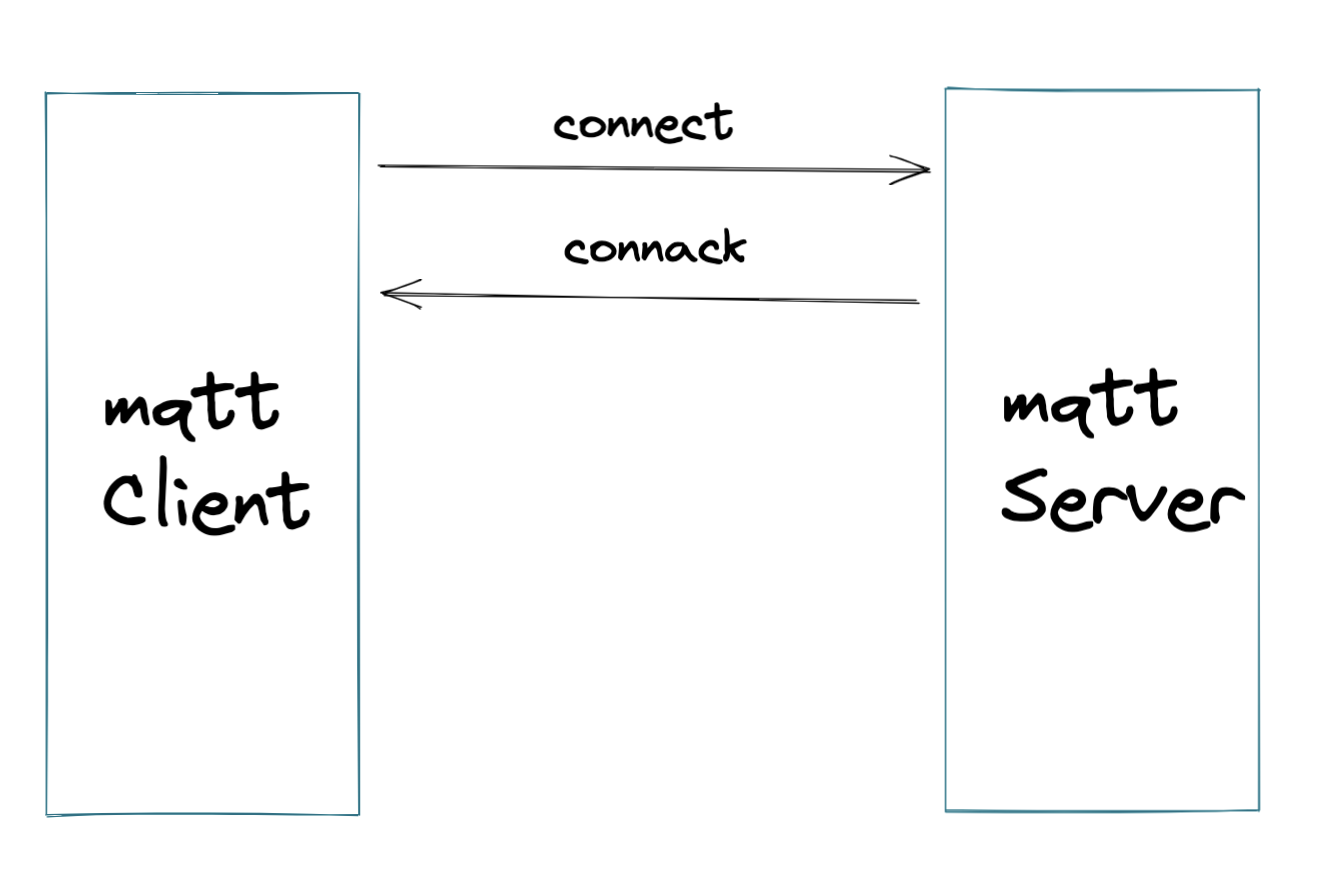
这是为什么呢,我们通过抓包发现仅仅只有客户端发送了Mqtt connect信息,服务端并没有响应

image-20201218171403188

但是根据mqtt标准协议,发送MqttConnect,必须有CONNAck

image-20201218180301759

所以我们要在mqttConn后,业务上返回ConnAck消息,下一节我们在这个基础上自己实现Handler返回Connack消息

参考

我们先创建一个MqttHandler,让他继承ChannelInboundHandlerAdapter, 用来接力MqttDecoder解码完成后的消息,这里要继承其中的channelRead方法

1
2
3
4
5
6
7
8
9
10
11
12
13
14
15
16
17
18
19
20
package com.github.hezhangjian.demo.iot.mqtt.broker;

import io.netty.channel.ChannelHandlerContext;
import io.netty.channel.ChannelInboundHandlerAdapter;
import lombok.extern.slf4j.Slf4j;

/**
* 处理Mqtt协议栈
* @author hezhangjian
*/
@Slf4j
public class MqttHandler extends ChannelInboundHandlerAdapter {

@Override
public void channelRead(ChannelHandlerContext ctx, Object msg) throws Exception {
super.channelRead(ctx, msg);
}

}

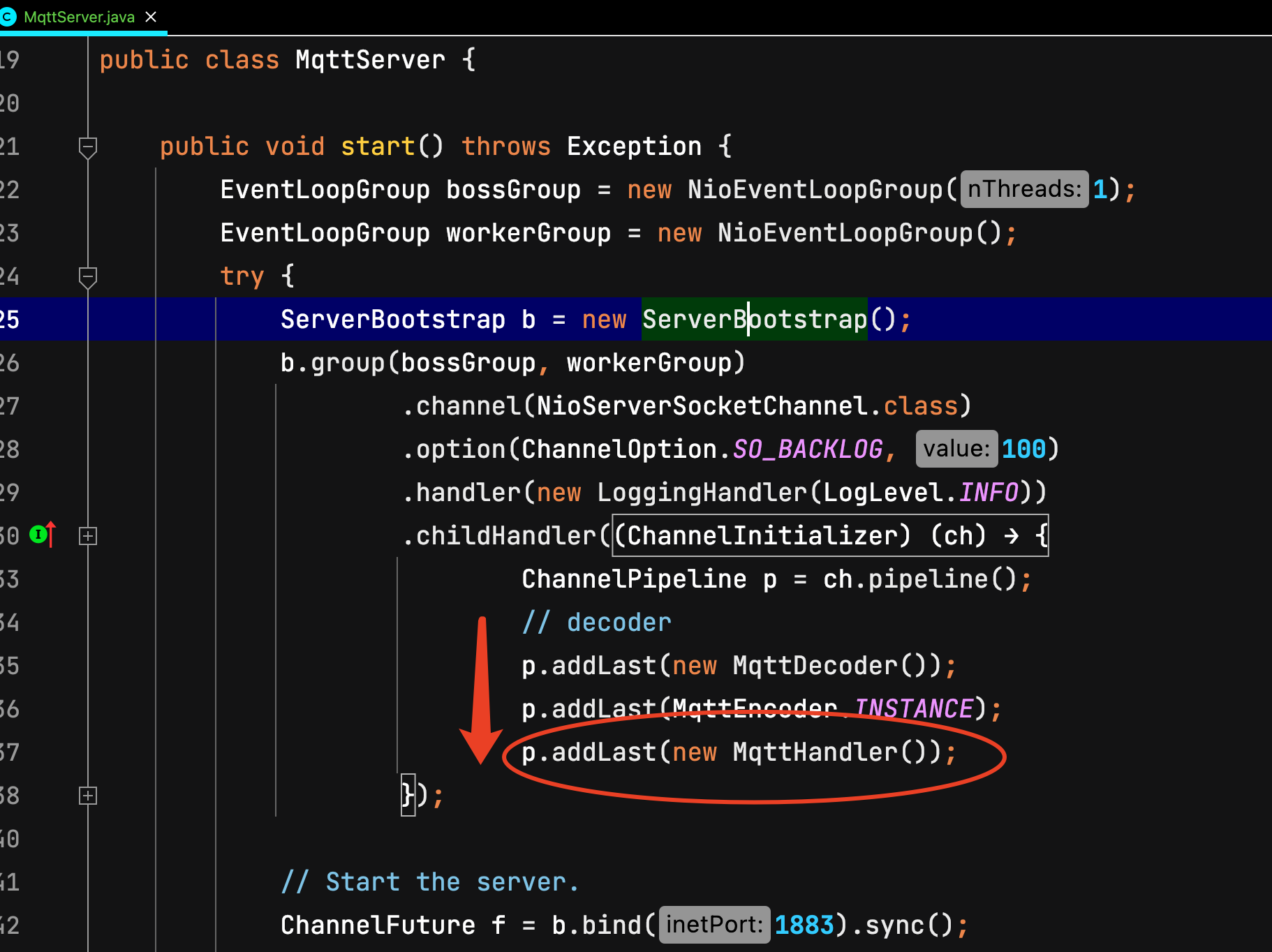
然后把这个handler加入到netty的职责链中,解码顺序

image-20201218204356576

打印出connectMessage如下

1
[MqttConnectMessage[fixedHeader=MqttFixedHeader[messageType=CONNECT, isDup=false, qosLevel=AT_MOST_ONCE, isRetain=false, remainingLength=22], variableHeader=MqttConnectVariableHeader[name=MQTT, version=4, hasUserName=false, hasPassword=false, isWillRetain=false, isWillFlag=false, isCleanSession=true, keepAliveTimeSeconds=60], payload=MqttConnectPayload[clientIdentifier=JavaSample, willTopic=null, willMessage=null, userName=null, password=null]]]

我们先忽略这些信息,无脑返回ack给他

1
final MqttConnAckMessage ackMessage = MqttMessageBuilders.connAck().returnCode(CONNECTION_ACCEPTED).build();

我们再运行起Server和Client,随后可以看到已经走过了Connect阶段,进入了publish message过程,接下来我们再实现更多的其他场景

附上此阶段的MessageHandler代码

1
2
3
4
5
6
7
8
9
10
11
12
13
14
15
16
17
18
19
20
21
22
23
24
25
26
27
28
29
30
31
32
33
34
35
36
37
38
39
40
41
42
package com.github.hezhangjian.demo.iot.mqtt.broker;

import io.netty.channel.ChannelHandlerContext;
import io.netty.channel.ChannelInboundHandlerAdapter;
import io.netty.handler.codec.mqtt.MqttConnAckMessage;
import io.netty.handler.codec.mqtt.MqttConnectMessage;
import io.netty.handler.codec.mqtt.MqttConnectPayload;
import io.netty.handler.codec.mqtt.MqttConnectVariableHeader;
import io.netty.handler.codec.mqtt.MqttFixedHeader;
import io.netty.handler.codec.mqtt.MqttMessageBuilders;
import lombok.extern.slf4j.Slf4j;

import static io.netty.handler.codec.mqtt.MqttConnectReturnCode.CONNECTION_ACCEPTED;

/**
* 处理Mqtt协议栈
*
* @author hezhangjian
*/
@Slf4j
public class MqttHandler extends ChannelInboundHandlerAdapter {

@Override
public void channelRead(ChannelHandlerContext ctx, Object msg) throws Exception {
super.channelRead(ctx, msg);
if (msg instanceof MqttConnectMessage) {
handleConnect(ctx, (MqttConnectMessage) msg);
} else {
log.error("Unsupported type msg [{}]", msg);
}
}

private void handleConnect(ChannelHandlerContext ctx, MqttConnectMessage connectMessage) {
log.info("connect msg is [{}]", connectMessage);
final MqttFixedHeader fixedHeader = connectMessage.fixedHeader();
final MqttConnectVariableHeader variableHeader = connectMessage.variableHeader();
final MqttConnectPayload connectPayload = connectMessage.payload();
final MqttConnAckMessage ackMessage = MqttMessageBuilders.connAck().returnCode(CONNECTION_ACCEPTED).build();
ctx.channel().writeAndFlush(ackMessage);
}

}

什么是sidecar?

kubernetes-sidecar-what-is

sidecar,直译为边车。 如上图所示,边车就是加装在摩托车旁来达到拓展功能的目的,比如行驶更加稳定,可以拉更多的人和货物,坐在边车上的人可以给驾驶员指路等。边车模式通过给应用服务加装一个“边车”来达到控制逻辑的分离的目的。

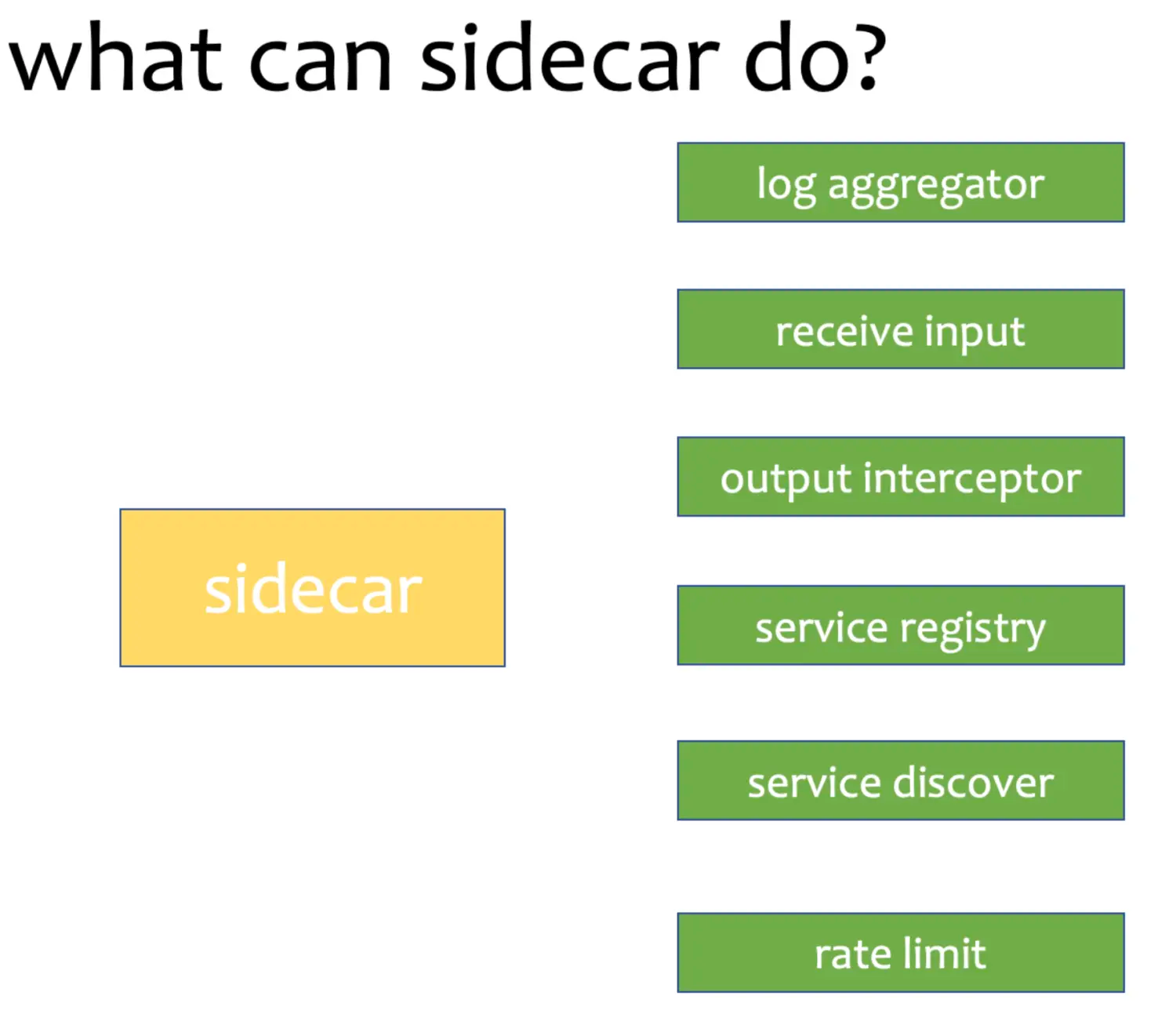
对于微服务来讲,我们可以用边车模式来做诸如 日志收集、服务注册、服务发现、限流、鉴权等不需要业务服务实现的控制面板能力。通常和边车模式比较的就是像spring-cloud那样的sdk模式,像上面提到的这些能力都通过sdk实现。

kubernetes-sidecar-what-can-do

这两种实现模式各有优劣,sidecar模式会引入额外的性能损耗以及延时,但传统的sdk模式会让代码变得臃肿并且升级复杂,控制面能力和业务面能力不能分开升级。

本文的代码已经上传到gitee

sidecar 实现原理

介绍了sidecar的诸多功能,但是,sidecar是如何做到这些能力的呢?

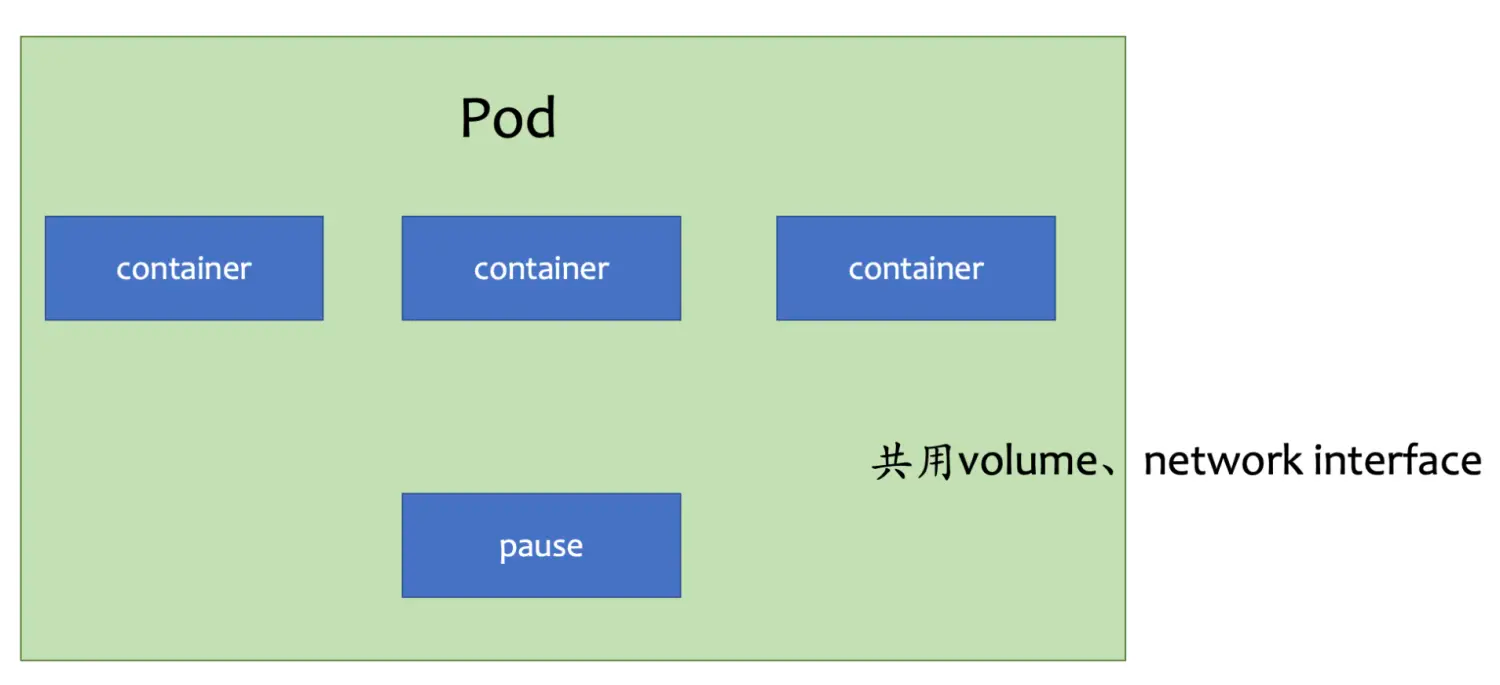
原来,在kubernetes中,一个pod是部署的最小单元,但一个pod里面,允许运行多个container(容器),多个container(容器)之间共享存储卷和网络栈。这样子,我们就可以多container来做sidecar,或者init-container(初始化容器)来调整挂载卷的权限

kubernetes-sidecar-inside

日志收集sidecar

日志收集sidecar的原理是利用多个container间可以共用挂载卷的原理实现的,通过将应用程序的日志路径挂出,用另一个程序访问路径下的日志来实现日志收集,这里用cat来替代了日志收集,部署yaml模板如下

1
2
3
4
5
6
7
8
9
10
11
12
13
14
15
16
17
18
19
20
21
22
23
apiVersion: v1
kind: Pod
metadata:
name: webserver
spec:
volumes:
- name: shared-logs
emptyDir: {}

containers:
- name: nginx
image: ttbb/nginx:mate
volumeMounts:
- name: shared-logs
mountPath: /opt/sh/openresty/nginx/logs

- name: sidecar-container
image: ttbb/base
command: ["sh","-c","while true; do cat /opt/sh/openresty/nginx/logs/nginx.pid; sleep 30; done"]
volumeMounts:
- name: shared-logs
mountPath: /opt/sh/openresty/nginx/logs

使用kubectl create -f 创建pod,通过kubectl logs命令就可以看到sidecar-container打印的日志输出

1
kubectl logs webserver sidecar-container

转发请求sidecar

这一节我们来实现,一个给应用程序转发请求的sidecar,应用程序代码如下

1
2
3
4
5
6
7
8
9
10
11
12
13
14
15
16
17
18
19
20
21
22
23
24
25
26
27
28
29
30
31
use std::io::prelude::*;
use std::net::{TcpListener, TcpStream};

fn main() {
let listener = TcpListener::bind("127.0.0.1:7878").unwrap();

for stream in listener.incoming() {
let stream = stream.unwrap();

handle_connection(stream);
}
println!("Hello, world!");
}

fn handle_connection(mut stream: TcpStream) {
let mut buffer = [0; 1024];

stream.read(&mut buffer).unwrap();

let contents = "Hello";

let response = format!(
"HTTP/1.1 200 OK\r\nContent-Length: {}\r\n\r\n{}",
contents.len(),
contents
);

println!("receive a request!");
stream.write(response.as_bytes()).unwrap();
stream.flush().unwrap();
}

我们再来写一个sidecar,它会每15秒向应用程序发出请求

1
2
3
4
5
6
7
8
9
10
use std::thread;
use std::time::Duration;

fn main() {
loop {
thread::sleep(Duration::from_secs(15));
let response = reqwest::blocking::get("http://localhost:7878").unwrap();
println!("{}", response.text().unwrap())
}
}

通过仓库下的intput/build.sh脚本构造镜像,运行yaml如下

1
2
3
4
5
6
7
8
9
10
11
apiVersion: v1
kind: Pod
metadata:
name: webserver
spec:
containers:
- name: input-server
image: sidecar-examples:input-http-server

- name: input-sidecar
image: sidecar-examples:sidecar-input

通过查看kubectl logs input input-http-server可以看到input-http-server收到了请求

1
2
receive a request!
receive a request!

拦截请求sidecar

应用程序代码,它会每15s向localhost发出请求

1
2
3
4
5
6
7
8
9
10
11
12
13
14
15
16
17
18
19
20
21
22
23
24
25
26
27
28
package com.hezhangjian.sidecar

import akka.actor.typed.ActorSystem
import akka.actor.typed.scaladsl.Behaviors
import akka.http.scaladsl.Http
import akka.http.scaladsl.model._

import scala.concurrent.{ExecutionContextExecutor, Future}
import scala.util.{Failure, Success}

object HttpClient {
def main(args: Array[String]): Unit = {
while (true) {
Thread.sleep(15_000L)
implicit val system: ActorSystem[Nothing] = ActorSystem(Behaviors.empty, "SingleRequest")
// needed for the future flatMap/onComplete in the end
implicit val executionContext: ExecutionContextExecutor = system.executionContext

val responseFuture: Future[HttpResponse] = Http().singleRequest(HttpRequest(uri = "http://localhost:7979/hello"))

responseFuture
.onComplete {
case Success(res) => println(res)
case Failure(_) => sys.error("something wrong")
}
}
}
}

我们再来写一个sidecar,它会拦截http请求并打印日志

1
2
3
4
5
6
7
8
9
10
11
12
13
14
15
16
17
18
19
20
21
22
23
24
25
26
27
28
29
30
31
32
33
package com.hezhangjian.sidecar

import akka.actor.typed.ActorSystem
import akka.actor.typed.scaladsl.Behaviors
import akka.http.scaladsl.Http
import akka.http.scaladsl.model._
import akka.http.scaladsl.server.Directives._

import scala.concurrent.ExecutionContextExecutor
import scala.io.StdIn

object HttpServer {

def main(args: Array[String]): Unit = {

implicit val system: ActorSystem[Nothing] = ActorSystem(Behaviors.empty, "my-system")
// needed for the future flatMap/onComplete in the end
implicit val executionContext: ExecutionContextExecutor = system.executionContext

val route =
path("hello") {
get {
println("receive a request")
complete(HttpEntity(ContentTypes.`text/html(UTF-8)`, "<h1>Say hello to akka-http</h1>"))
}
}

val bindingFuture = Http().newServerAt("localhost", 7979).bind(route)
while (true) {
Thread.sleep(15_000L)
}
}
}

通过仓库下的output/build.sh脚本构造镜像,运行yaml如下

1
2
3
4
5
6
7
8
9
10
11
12
13
14
15
16
17
apiVersion: v1
kind: Pod
metadata:
name: output
spec:
volumes:
- name: shared-logs
emptyDir: {}

containers:
- name: output-workload
image: sidecar-examples:output-workload
imagePullPolicy: Never

- name: sidecar-output
image: sidecar-examples:sidecar-output
imagePullPolicy: Never

通过查看kubectl logs output output-workload可以看到output-sidecar收到了请求

1
2
3
4
5
6
7
8
HttpResponse(200 OK,List(Server: akka-http/10.2.9, Date: Tue, 29 Mar 2022 00:15:47 GMT),HttpEntity.Strict(text/html; charset=UTF-8,31 bytes total),HttpProtocol(HTTP/1.1))
HttpResponse(200 OK,List(Server: akka-http/10.2.9, Date: Tue, 29 Mar 2022 00:16:02 GMT),HttpEntity.Strict(text/html; charset=UTF-8,31 bytes total),HttpProtocol(HTTP/1.1))
HttpResponse(200 OK,List(Server: akka-http/10.2.9, Date: Tue, 29 Mar 2022 00:16:17 GMT),HttpEntity.Strict(text/html; charset=UTF-8,31 bytes total),HttpProtocol(HTTP/1.1))
HttpResponse(200 OK,List(Server: akka-http/10.2.9, Date: Tue, 29 Mar 2022 00:16:32 GMT),HttpEntity.Strict(text/html; charset=UTF-8,31 bytes total),HttpProtocol(HTTP/1.1))
HttpResponse(200 OK,List(Server: akka-http/10.2.9, Date: Tue, 29 Mar 2022 00:16:47 GMT),HttpEntity.Strict(text/html; charset=UTF-8,31 bytes total),HttpProtocol(HTTP/1.1))
HttpResponse(200 OK,List(Server: akka-http/10.2.9, Date: Tue, 29 Mar 2022 00:17:02 GMT),HttpEntity.Strict(text/html; charset=UTF-8,31 bytes total),HttpProtocol(HTTP/1.1))
HttpResponse(200 OK,List(Server: akka-http/10.2.9, Date: Tue, 29 Mar 2022 00:17:17 GMT),HttpEntity.Strict(text/html; charset=UTF-8,31 bytes total),HttpProtocol(HTTP/1.1))
HttpResponse(200 OK,List(Server: akka-http/10.2.9, Date: Tue, 29 Mar 2022 00:17:32 GMT),HttpEntity.Strict(text/html; charset=UTF-8,31 bytes total),HttpProtocol(HTTP/1.1))

未书写插件前

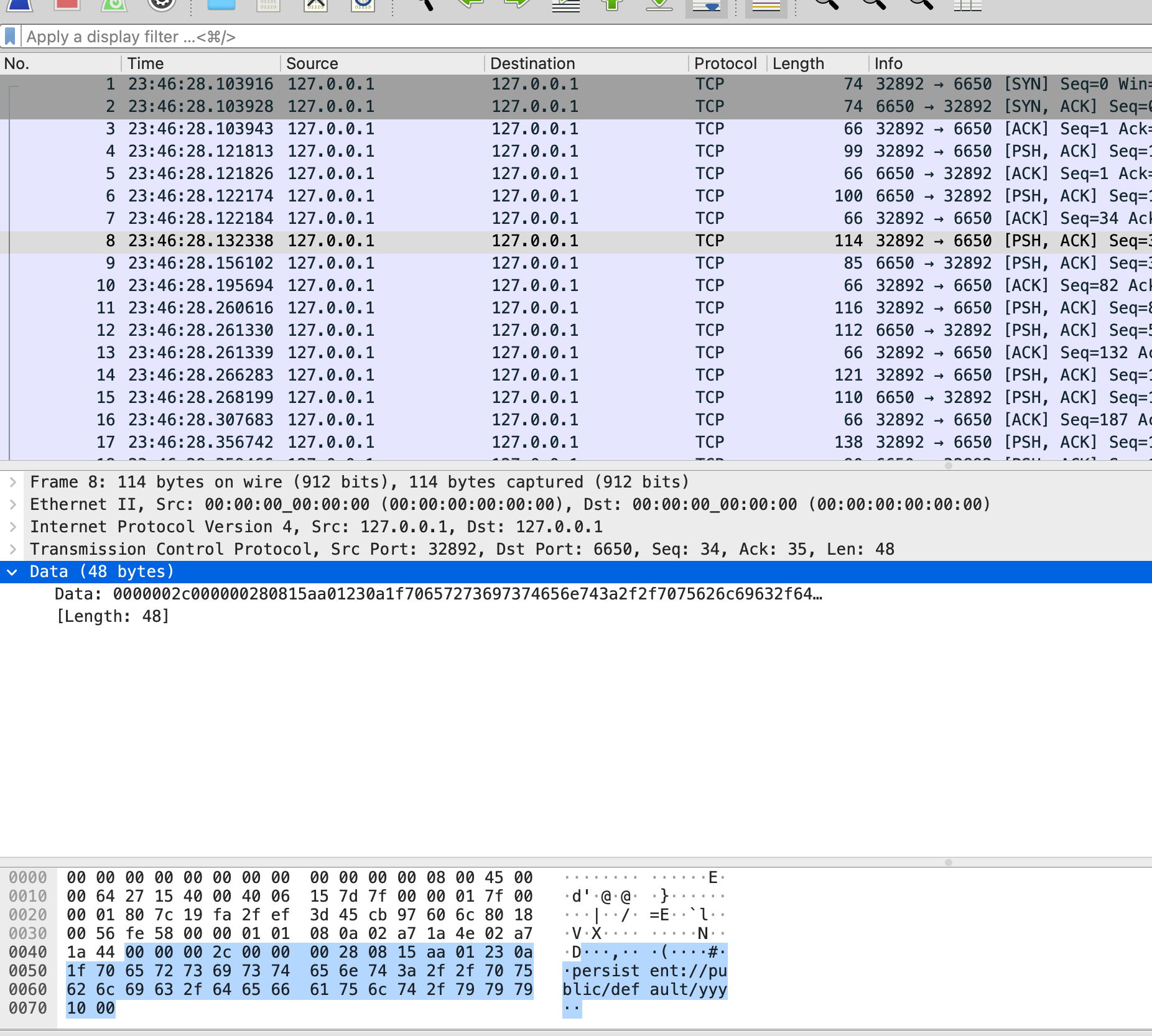
wireshark的协议不支持之前,报文几乎难以分析,举例如下

image-20210908144418891

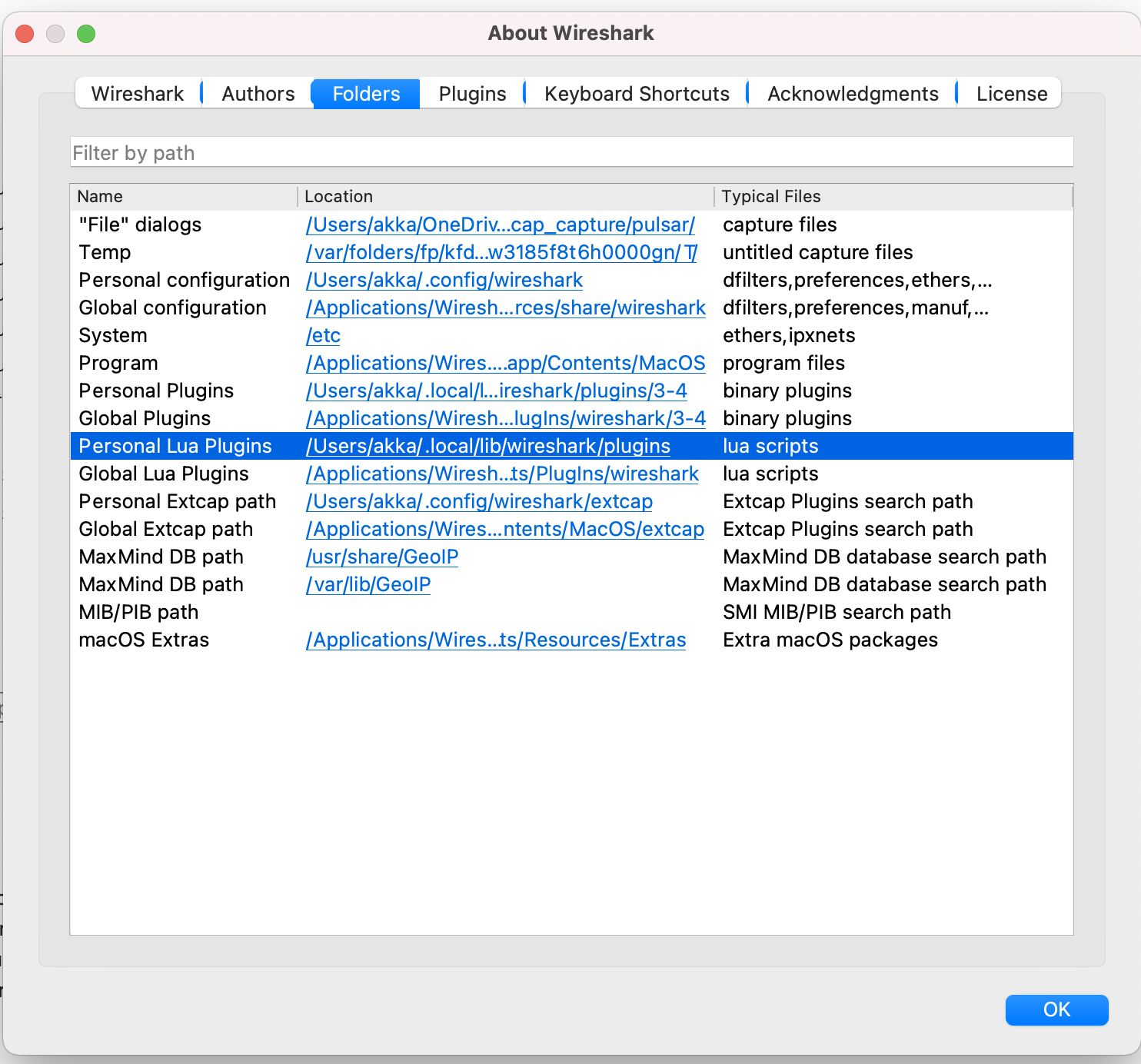
Wireshark插件路径

MAC

image-20210908142121894

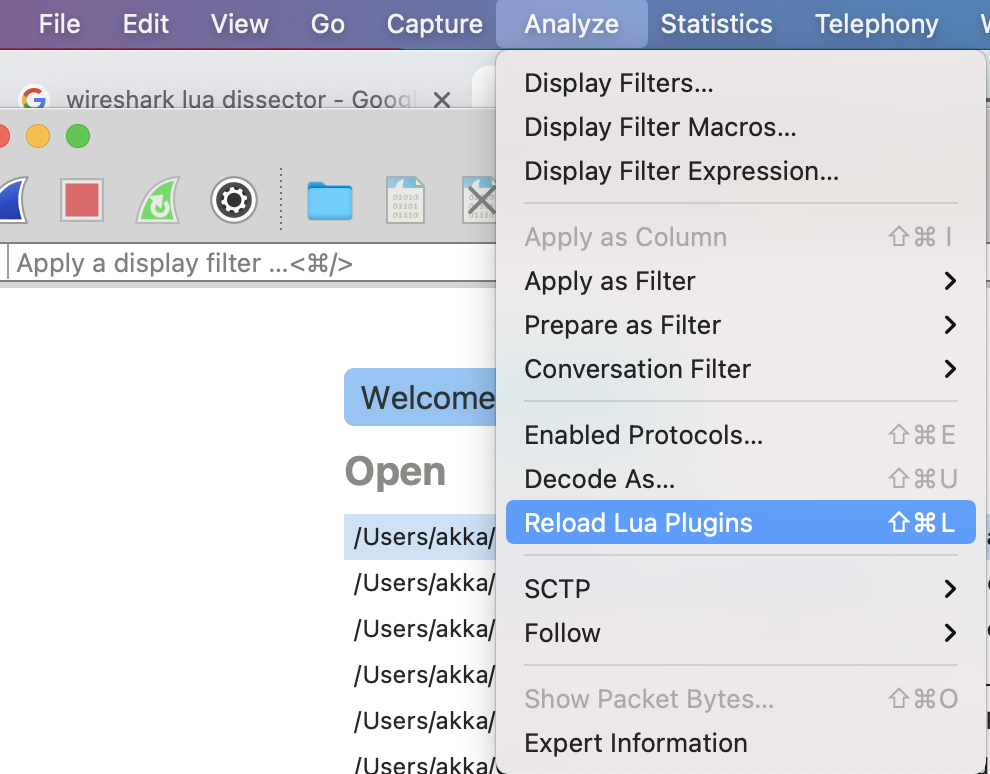
重新加载Wireshark中的lua插件

MAC

image-20210908141433962

从一个新协议的样板开始

1
2
3
4
5
6
7
8
9
10
11
12
13
14
15
pulsar_protocol = Proto("Pulsar", "Pulsar Protocol")

pulsar_protocol.fields = {}

function pulsar_protocol.dissector(buffer, pinfo, tree)
length = buffer:len()
if length == 0 then
return
end
pinfo.cols.protocol = pulsar_protocol.name
local subtree = tree:add(pulsar_protocol, buffer(), "Pulsar Protocol Data")
end

local tcp_port = DissectorTable.get("tcp.port")
tcp_port:add(6650, pulsar_protocol)

我们从协议对象开始,命名为pulsar_protocol。构造函数两个参数分别为名称和描述。协议需要一个fields表和dissecotr函数。我们现在还没有任何field,所以fields表为空。对于每一个报文,dissctor函数都会被调用一次。

dissector函数有三个入参,bufferpinfo,和treebuffer包含了网络包的内容,是一个Tvb对象。pinfo包含了wireshark中展示packet的列信息,是一个Pinfo对象。tree是wireshark报文详情显示的内容,是TreeItem对象。

dissector函数中,我们检查buffer的长度,如果长度为0,则立即返回

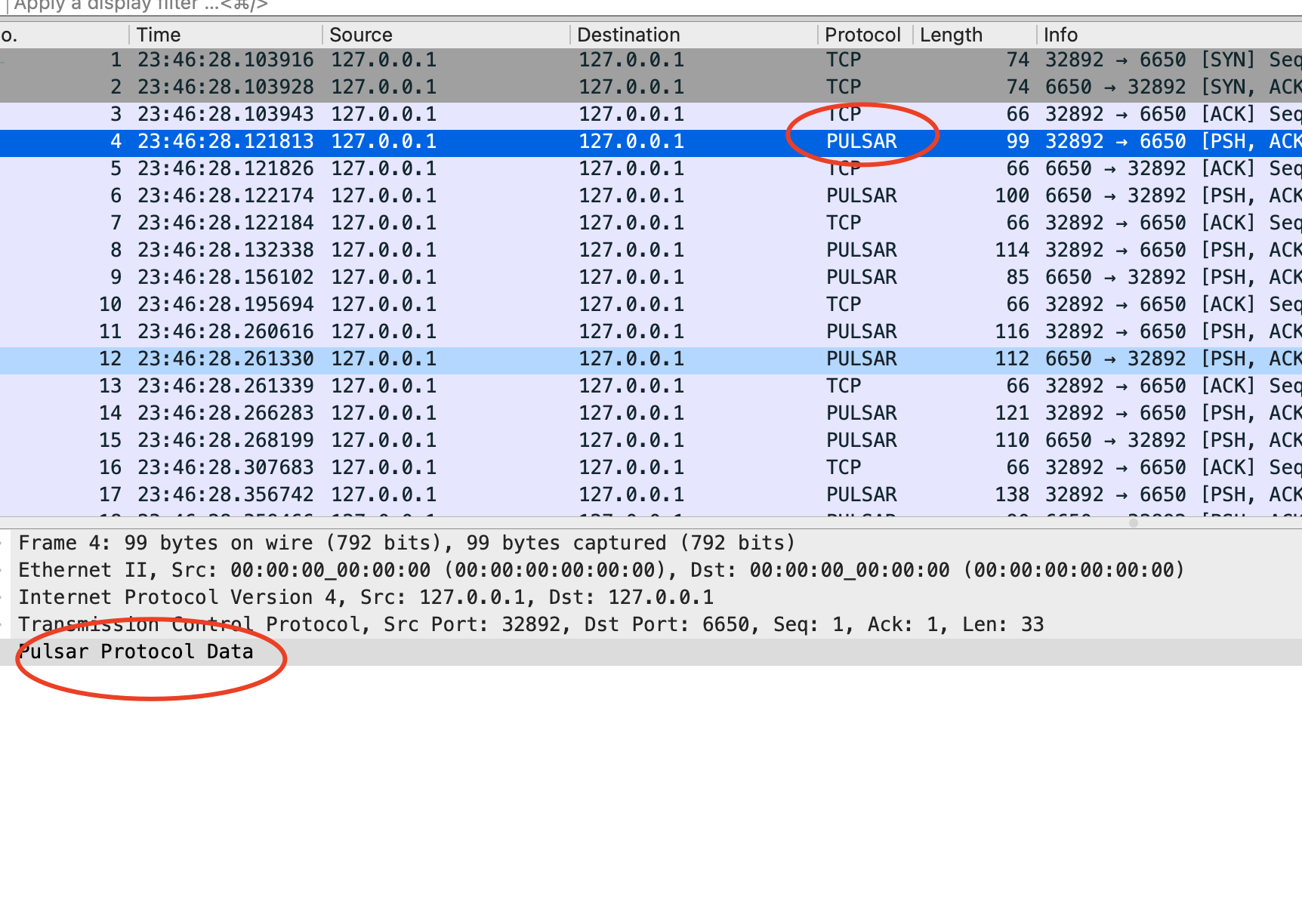
pinfo对象包含着列信息,我们可以将pinfo的protocol设置为pulsar,显示在wireshark的界面中。接下来在packet的结构中创建一个子树,最后,我们把协议绑定到6650端口上。让我们加载这个lua插件

1
2
mkdir -p ~/.local/lib/wireshark/plugins
cp $DIR/../../pulsar_dissector.lua ~/.local/lib/wireshark/plugins/pulsar_dissector.lua

结果符合预期

image-20210908145821228

添加长度字段

让我们添加一个长度字段,pulsar协议中,长度字段即就是前4个字节,定义字段

1
2
3
message_length = ProtoField.int32("pulsar.message_length", "messageLength", base.DEC)

pulsar_protocol.fields = { message_length }

pulsar.message_length可以用在过滤器字段中。messageLength是子树中的label。第三个字段决定了这个值会被如何展示

最后,我们把长度值加入到Wireshark的tree中

1
subtree:add(message_length, buffer(0,4))

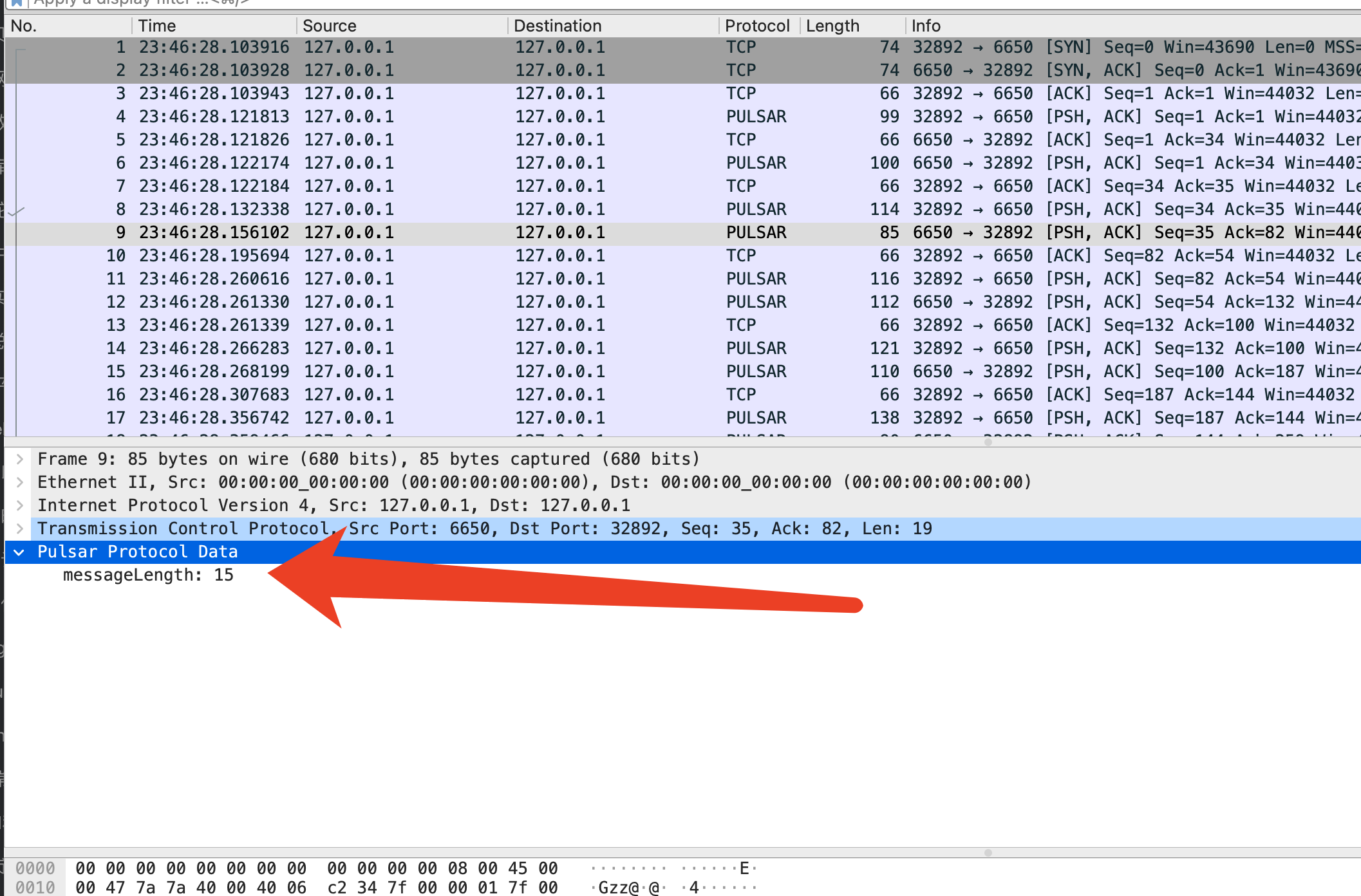
pulsar的协议是大端序,我们使用add函数。如果协议是小端序,我们就可以使用addle函数。

image-20210908153825471

我们添加的message_length字段已经可以显示在Wireshark中了

添加额外信息

protoc加入到wireshark

参考及附录

proto field函数列表

https://www.wireshark.org/docs/wsdg_html_chunked/lua_module_Proto.html#lua_fn_ProtoField_char_abbr___name____base____valuestring____mask____desc__

wireshark解析protobuf

https://ask.wireshark.org/question/15787/how-to-decode-protobuf-by-wireshark/

maven checkstyle

添加maven plugin依赖

1
2
3
4
5
6
7
8
9
10
11
12
<plugin>
<groupId>org.apache.maven.plugins</groupId>
<artifactId>maven-checkstyle-plugin</artifactId>
<version>3.1.2</version>
<configuration>
<configLocation>config/checkstyle.xml</configLocation>
<suppressionsLocation>config/suppressions.xml</suppressionsLocation>
<includeTestSourceDirectory>true</includeTestSourceDirectory>
<encoding>UTF-8</encoding>
<excludes>**/proto/*</excludes>
</configuration>
</plugin>
  • configLocation 存放checkstyle的规则配置文件,附录有样例内容
  • SuppressionsLocation 存放屏蔽规则配置文件,附录有样例内容
  • includeTestSourceDirectory 是否检测测试文件夹,建议配置为true

maven-lint-checkstyle-config

结束

最后就可以通过mvn checkstyle:check来检查您的工程啦。如果有违反了checkstyle的地方,命令行会提示出错的地方和违反的规则,如下图所示

maven-lint-checkstyle-fail1

maven-lint-checkstyle-fail2

附录

规则配置文件举例

1
2
3
4
5
6
7
8
9
10
11
12
13
14
15
16
17
18
19
20
21
22
23
24
25
26
27
28
29
30
31
32
33
34
35
36
37
38
39
40
41
42
43
44
45
46
47
48
49
50
51
52
53
54
55
56
57
58
59
60
61
62
63
64
65
66
67
68
69
70
71
72
73
74
75
76
77
78
79
80
81
82
83
84
85
86
87
88
89
90
91
92
93
94
95
96
97
98
99
100
101
102
103
104
105
106
107
108
109
110
111
112
113
114
115
116
117
118
119
120
121
122
123
124
125
126
127
128
129
130
131
132
133
134
135
136
137
138
139
140
141
142
143
144
145
146
147
148
149
150
151
152
153
154
155
156
157
158
159
160
161
162
163
164
165
166
167
168
169
170
171
172
173
174
175
176
177
178
179
180
181
182
183
184
185
186
187
188
189
190
191
192
193
194
195
196
197
198
199
200
201
202
203
204
205
206
207
208
209
210
211
212
213
214
215
216
217
218
219
220
221
222
223
224
225
226
227
228
229
230
231
232
233
234
235
236
237
238
239
240
241
242
243
244
245
246
247
248
249
250
251
252
253
254
255
256
257
258
259
260
261
262
263
264
265
266
267
268
269
270
271
272
273
274
275
276
277
278
279
280
281
282
283
284
285
286
287
288
289
290
291
292
293
294
295
296
297
298
299
300
301
302
303
304
305
306
307
308
309
310
311
312
313
314
315
316
317
318
319
320
321
322
323
324
325
326
327
328
329
330
331
332
333
<?xml version="1.0" encoding="UTF-8"?>
<!DOCTYPE module PUBLIC
"-//Puppy Crawl//DTD Check Configuration 1.3//EN"
"https://checkstyle.org/dtds/configuration_1_3.dtd">

<!-- This is a checkstyle configuration file. For descriptions of
what the following rules do, please see the checkstyle configuration
page at http://checkstyle.sourceforge.net/config.html -->
<module name="Checker">
<module name="FileTabCharacter">
<!-- Checks that there are no tab characters in the file. -->
</module>

<!-- All Java AST specific tests live under TreeWalker module. -->
<module name="TreeWalker">

<module name="SuppressionCommentFilter">
<property name="offCommentFormat" value="CHECKSTYLE.OFF\: ([\w\|]+)"/>
<property name="onCommentFormat" value="CHECKSTYLE.ON\: ([\w\|]+)"/>
<property name="checkFormat" value="$1"/>
</module>

<module name="SuppressWarningsHolder" />

<!--

IMPORT CHECKS

-->

<module name="RedundantImport">
<!-- Checks for redundant import statements. -->
<property name="severity" value="error"/>
<message key="import.redundancy"
value="Redundant import {0}."/>
</module>

<module name="AvoidStarImport">
<property name="severity" value="error"/>
</module>

<module name="RedundantModifier">
<!-- Checks for redundant modifiers on various symbol definitions.
See: http://checkstyle.sourceforge.net/config_modifier.html#RedundantModifier
-->
<property name="tokens" value="METHOD_DEF, VARIABLE_DEF, ANNOTATION_FIELD_DEF, INTERFACE_DEF, CLASS_DEF, ENUM_DEF"/>
</module>

<!--
IllegalImport cannot blacklist classes, and c.g.api.client.util is used for some shaded
code and some useful code. So we need to fall back to Regexp.
-->
<module name="RegexpSinglelineJava">
<property name="format" value="com\.google\.api\.client\.util\.(ByteStreams|Charsets|Collections2|Joiner|Lists|Maps|Objects|Preconditions|Sets|Strings|Throwables)"/>
</module>

<!--
Require static importing from Preconditions.
-->
<module name="RegexpSinglelineJava">
<property name="format" value="^import com.google.common.base.Preconditions;$"/>
<property name="message" value="Static import functions from Guava Preconditions"/>
</module>

<module name="UnusedImports">
<property name="severity" value="error"/>
<property name="processJavadoc" value="true"/>
<message key="import.unused"
value="Unused import: {0}."/>
</module>

<!--

JAVADOC CHECKS

-->

<!-- Checks for Javadoc comments. -->
<!-- See http://checkstyle.sf.net/config_javadoc.html -->
<module name="JavadocMethod">
<property name="scope" value="protected"/>
<property name="severity" value="error"/>
<property name="allowMissingParamTags" value="true"/>
<property name="allowMissingReturnTag" value="true"/>
</module>

<!-- Check that paragraph tags are used correctly in Javadoc. -->
<!-- <module name="JavadocParagraph"/>-->

<module name="JavadocType">
<property name="scope" value="protected"/>
<property name="severity" value="error"/>
<property name="allowMissingParamTags" value="true"/>
</module>

<module name="JavadocStyle">
<property name="severity" value="error"/>
<property name="checkHtml" value="true"/>
</module>

<!--

NAMING CHECKS

-->

<!-- Item 38 - Adhere to generally accepted naming conventions -->

<module name="PackageName">
<!-- Validates identifiers for package names against the
supplied expression. -->
<!-- Here the default checkstyle rule restricts package name parts to
seven characters, this is not in line with common practice at Google.
-->
<property name="format" value="^[a-z]+(\.[a-z][a-z0-9]{1,})*$"/>
<property name="severity" value="error"/>
</module>

<module name="TypeNameCheck">
<!-- Validates static, final fields against the
expression "^[A-Z][a-zA-Z0-9]*$". -->
<metadata name="altname" value="TypeName"/>
<property name="severity" value="error"/>
</module>

<module name="ConstantNameCheck">
<!-- Validates non-private, static, final fields against the supplied
public/package final fields "^[A-Z][A-Z0-9]*(_[A-Z0-9]+)*$". -->
<metadata name="altname" value="ConstantName"/>
<property name="applyToPublic" value="true"/>
<property name="applyToProtected" value="true"/>
<property name="applyToPackage" value="true"/>
<property name="applyToPrivate" value="false"/>
<property name="format" value="^([A-Z][A-Za-z0-9_]*|FLAG_.*)$"/>
<message key="name.invalidPattern"
value="Variable ''{0}'' should be in ALL_CAPS (if it is a constant) or be private (otherwise)."/>
<property name="severity" value="error"/>
</module>

<module name="StaticVariableNameCheck">
<!-- Validates static, non-final fields against the supplied
expression "^[a-z][a-zA-Z0-9]*_?$". -->
<metadata name="altname" value="StaticVariableName"/>
<property name="applyToPublic" value="true"/>
<property name="applyToProtected" value="true"/>
<property name="applyToPackage" value="true"/>
<property name="applyToPrivate" value="true"/>
<property name="format" value="^[a-z][a-zA-Z0-9]*_?$"/>
<property name="severity" value="error"/>
</module>

<module name="MemberNameCheck">
<!-- Validates non-static members against the supplied expression. -->
<metadata name="altname" value="MemberName"/>
<property name="applyToPublic" value="true"/>
<property name="applyToProtected" value="true"/>
<property name="applyToPackage" value="true"/>
<property name="applyToPrivate" value="true"/>
<property name="format" value="^[a-z][a-zA-Z0-9]*$"/>
<property name="severity" value="error"/>
</module>

<module name="MethodNameCheck">
<!-- Validates identifiers for method names. -->
<metadata name="altname" value="MethodName"/>
<property name="format" value="(^[a-z][a-zA-Z0-9]*(_[a-zA-Z0-9]+)*$|Void)"/>
<property name="severity" value="error"/>
</module>

<module name="ParameterName">
<!-- Validates identifiers for method parameters against the
expression "^[a-z][a-zA-Z0-9]*$". -->
<property name="severity" value="error"/>
</module>

<module name="LocalFinalVariableName">
<!-- Validates identifiers for local final variables against the
expression "^[a-z][a-zA-Z0-9]*$". -->
<property name="severity" value="error"/>
</module>

<module name="LocalVariableName">
<!-- Validates identifiers for local variables against the
expression "^[a-z][a-zA-Z0-9]*$". -->
<property name="severity" value="error"/>
</module>

<!-- Type parameters must be either one of the four blessed letters
T, K, V, W, X or else be capital-case terminated with a T,
such as MyGenericParameterT -->
<module name="ClassTypeParameterName">
<property name="format" value="^(((T|K|V|W|X|R)[0-9]*)|([A-Z][a-z][a-zA-Z]*))$"/>
<property name="severity" value="error"/>
</module>

<module name="MethodTypeParameterName">
<property name="format" value="^(((T|K|V|W|X|R)[0-9]*)|([A-Z][a-z][a-zA-Z]*T))$"/>
<property name="severity" value="error"/>
</module>

<module name="InterfaceTypeParameterName">
<property name="format" value="^(((T|K|V|W|X|R)[0-9]*)|([A-Z][a-z][a-zA-Z]*T))$"/>
<property name="severity" value="error"/>
</module>

<module name="LeftCurly">
<!-- Checks for placement of the left curly brace ('{'). -->
<property name="severity" value="error"/>
</module>

<module name="RightCurly">
<!-- Checks right curlies on CATCH, ELSE, and TRY blocks are on
the same line. e.g., the following example is fine:
<pre>
if {
...
} else
</pre>
-->
<!-- This next example is not fine:
<pre>
if {
...
}
else
</pre>
-->
<property name="option" value="same"/>
<property name="severity" value="error"/>
</module>

<!-- Checks for braces around if and else blocks -->
<module name="NeedBraces">
<property name="severity" value="error"/>
<property name="tokens" value="LITERAL_IF, LITERAL_ELSE, LITERAL_FOR, LITERAL_WHILE, LITERAL_DO"/>
</module>

<module name="UpperEll">
<!-- Checks that long constants are defined with an upper ell.-->
<property name="severity" value="error"/>
</module>

<module name="FallThrough">
<!-- Warn about falling through to the next case statement. Similar to
javac -Xlint:fallthrough, but the check is suppressed if a single-line comment
on the last non-blank line preceding the fallen-into case contains 'fall through' (or
some other variants that we don't publicized to promote consistency).
-->
<property name="reliefPattern"
value="fall through|Fall through|fallthru|Fallthru|falls through|Falls through|fallthrough|Fallthrough|No break|NO break|no break|continue on"/>
<property name="severity" value="error"/>
</module>

<!-- Checks for over-complicated boolean expressions. -->
<module name="SimplifyBooleanExpression"/>

<!-- Detects empty statements (standalone ";" semicolon). -->
<module name="EmptyStatement"/>

<!--

WHITESPACE CHECKS

-->

<module name="WhitespaceAround">
<!-- Checks that various tokens are surrounded by whitespace.
This includes most binary operators and keywords followed
by regular or curly braces.
-->
<property name="tokens" value="ASSIGN, BAND, BAND_ASSIGN, BOR,
BOR_ASSIGN, BSR, BSR_ASSIGN, BXOR, BXOR_ASSIGN, COLON, DIV, DIV_ASSIGN,
EQUAL, GE, GT, LAND, LE, LITERAL_CATCH, LITERAL_DO, LITERAL_ELSE,
LITERAL_FINALLY, LITERAL_FOR, LITERAL_IF, LITERAL_RETURN,
LITERAL_SYNCHRONIZED, LITERAL_TRY, LITERAL_WHILE, LOR, LT, MINUS,
MINUS_ASSIGN, MOD, MOD_ASSIGN, NOT_EQUAL, PLUS, PLUS_ASSIGN, QUESTION,
SL, SL_ASSIGN, SR_ASSIGN, STAR, STAR_ASSIGN"/>
<property name="severity" value="error"/>
</module>

<module name="WhitespaceAfter">
<!-- Checks that commas, semicolons and typecasts are followed by
whitespace.
-->
<property name="tokens" value="COMMA, SEMI, TYPECAST"/>
</module>

<module name="NoWhitespaceAfter">
<!-- Checks that there is no whitespace after various unary operators.
Linebreaks are allowed.
-->
<property name="tokens" value="BNOT, DEC, DOT, INC, LNOT, UNARY_MINUS,
UNARY_PLUS"/>
<property name="allowLineBreaks" value="true"/>
<property name="severity" value="error"/>
</module>

<module name="NoWhitespaceBefore">
<!-- Checks that there is no whitespace before various unary operators.
Linebreaks are allowed.
-->
<property name="tokens" value="SEMI, DOT, POST_DEC, POST_INC"/>
<property name="allowLineBreaks" value="true"/>
<property name="severity" value="error"/>
</module>

<module name="OperatorWrap">
<!-- Checks that operators like + and ? appear at newlines rather than
at the end of the previous line.
-->
<property name="option" value="NL"/>
<property name="tokens" value="BAND, BOR, BSR, BXOR, DIV, EQUAL,
GE, GT, LAND, LE, LITERAL_INSTANCEOF, LOR, LT, MINUS, MOD,
NOT_EQUAL, PLUS, QUESTION, SL, SR, STAR "/>
</module>

<module name="OperatorWrap">
<!-- Checks that assignment operators are at the end of the line. -->
<property name="option" value="eol"/>
<property name="tokens" value="ASSIGN"/>
</module>

<module name="ParenPad">
<!-- Checks that there is no whitespace before close parens or after
open parens.
-->
<property name="severity" value="error"/>
</module>

<module name="ModifierOrder"/>

</module>
</module>

屏蔽规则配置文件举例

1
2
3
4
5
6
7
8
9
10
11
<?xml version="1.0"?>
<!DOCTYPE suppressions PUBLIC
"-//Puppy Crawl//DTD Suppressions 1.1//EN"
"https://checkstyle.org/dtds/configuration_1_3.dtd">

<suppressions>
<!-- suppress all checks in the generated directories -->
<suppress checks=".*" files=".+[\\/]generated[\\/].+\.java"/>
<suppress checks=".*" files=".+[\\/]generated-sources[\\/].+\.java"/>
<suppress checks=".*" files=".+[\\/]generated-test-sources[\\/].+\.java"/>
</suppressions>

maven dependency-check

引入dependnecy-check插件

项目中原有的依赖是这样的

1
2
3
4
5
<dependency>
<groupId>io.netty</groupId>
<artifactId>netty-all</artifactId>
<version>4.1.41.Final</version>
</dependency>
1
2
3
4
5
6
7
8
9
10
11
12
13
14
15
16
17
18
19
20
21
22
23
24
25
26
27
28
29
30
31
<plugin>
<groupId>org.owasp</groupId>
<artifactId>dependency-check-maven</artifactId>
<version>${dependency-check-maven.version}</version>
<configuration>
<suppressionFiles>
<suppressionFile>src/owasp-dependency-check-suppressions.xml</suppressionFile>
</suppressionFiles>
<failBuildOnCVSS>7</failBuildOnCVSS>
<msbuildAnalyzerEnabled>false</msbuildAnalyzerEnabled>
<nodeAnalyzerEnabled>false</nodeAnalyzerEnabled>
<yarnAuditAnalyzerEnabled>false</yarnAuditAnalyzerEnabled>
<pyDistributionAnalyzerEnabled>false</pyDistributionAnalyzerEnabled>
<pyPackageAnalyzerEnabled>false</pyPackageAnalyzerEnabled>
<pipAnalyzerEnabled>false</pipAnalyzerEnabled>
<pipfileAnalyzerEnabled>false</pipfileAnalyzerEnabled>
<retireJsAnalyzerEnabled>false</retireJsAnalyzerEnabled>
<msbuildAnalyzerEnabled>false</msbuildAnalyzerEnabled>
<mixAuditAnalyzerEnabled>false</mixAuditAnalyzerEnabled>
<nugetconfAnalyzerEnabled>false</nugetconfAnalyzerEnabled>
<assemblyAnalyzerEnabled>false</assemblyAnalyzerEnabled>
<skipSystemScope>true</skipSystemScope>
</configuration>
<executions>
<execution>
<goals>
<goal>aggregate</goal>
</goals>
</execution>
</executions>
</plugin>

然后可以通过mvn clean install verify -DskipTests来检测。这个demo下,会输出

1
2
3
4
5
[ERROR] One or more dependencies were identified with vulnerabilities that have a CVSS score greater than or equal to '7.0': 
[ERROR]
[ERROR] netty-all-4.1.41.Final.jar: CVE-2019-16869(7.5), CVE-2021-37136(7.5), CVE-2020-11612(7.5), CVE-2021-37137(7.5), CVE-2019-20445(9.1), CVE-2019-20444(9.1), CVE-2020-7238(7.5)
[ERROR]
[ERROR] See the dependency-check report for more details.

实际使用时,由于dependency-check检查相对耗时,一般通过单独的profile来控制开关

屏蔽CVE漏洞

如果出现dependency-check误报或者是评估该漏洞不涉及,可以通过supression file来屏蔽

屏蔽单一CVE漏洞

1
2
3
4
5
6
7
<suppress>
<notes><![CDATA[
file name: zookeeper-prometheus-metrics-3.8.0.jar
]]></notes>
<sha1>849e8ece2845cb0185d721233906d487a7f1e4cf</sha1>
<cve>CVE-2021-29425</cve>
</suppress>

通过文件正则来屏蔽CVE漏洞

1
2
3
4
5
<suppress>
<notes>CVE-2011-1797 FP, see https://github.com/jeremylong/DependencyCheck/issues/4154</notes>
<filePath regex="true">.*netty-tcnative-boringssl-static.*\.jar</filePath>
<cve>CVE-2011-1797g</cve>
</suppress>

本文的代码已上传到github

交互式shell常用在输入密码的场景,为了防止密码泄露在cmdline中被ps -ef读取

举个🌰

1
2
3
4
#!/bin/bash

read -s -p "Enter Password: " pwd
echo -e "\nYour password is: " $pwd

go调用交互式shell代码样例如下

1
2
3
4
5
6
7
8
9
10
11
12
13
14
15
16
17
18
19
20
21
func TestCallInteractiveShell(t *testing.T) {
dir, err := os.Getwd()
if err != nil {
panic(err)
}
cmd := exec.Command("/bin/bash", dir+"/interactive_shell.sh")
var stdout, stderr bytes.Buffer
cmd.Stdout = &stdout
cmd.Stderr = &stderr
buffer := bytes.Buffer{}
buffer.Write([]byte("ZhangJian"))
cmd.Stdin = &buffer
err = cmd.Run()
if err != nil {
panic(err)
}
outStr, errStr := string(stdout.Bytes()), string(stderr.Bytes())
fmt.Println("output is ", outStr)
fmt.Println("err output is ", errStr)
fmt.Println("Execute Over")
}

输出结果

1
2
3
4
5
6
7
=== RUN   TestCallInteractiveShell
output is Your password is: ZhangJian

err output is
Execute Over
--- PASS: TestCallInteractiveShell (0.00s)
PASS

Java系的TLS一般都会要这么几个参数

  • client.keystore
  • client.truststore
  • client.password
  • server.keystore
  • server.truststore
  • server.password

生成证书

1
2
3
4
5
6
7
8
9
10
11
12
13
14
15
16
17
18
client_pass=zk_client_pwd
server_pass=zk_server_pwd
server_dname="C=CN,ST=GD,L=SZ,O=sh,OU=sh,CN=hezhangjian"
client_dname="C=CN,ST=GD,L=SZ,O=sh,OU=sh,CN=hezhangjian"
echo "generate client keystore"
keytool -genkeypair -keypass $client_pass -storepass $client_pass -dname $client_dname -keyalg RSA -keysize 2048 -validity 3650 -keystore zk_client_key.jks
echo "generate server keystore"
keytool -genkeypair -keypass $server_pass -storepass $server_pass -dname $server_dname -keyalg RSA -keysize 2048 -validity 3650 -keystore zk_server_key.jks
echo "export server certificate"
keytool -exportcert -keystore zk_server_key.jks -file server.cer -storepass $server_pass
echo "export client certificate"
keytool -exportcert -keystore zk_client_key.jks -file client.cer -storepass $client_pass
echo "add server cert to client trust keystore"
keytool -importcert -keystore zk_client_trust.jks -file server.cer -storepass $client_pass -noprompt
echo "add client cert to server trust keystore"
keytool -importcert -keystore zk_server_trust.jks -file client.cer -storepass $server_pass -noprompt
rm -f server.cer
rm -f client.cer

添加ZooKeeper配置

1
secureClientPort=2182

服务端启动

1
2
3
4
5
6
7
export SERVER_JVMFLAGS="
-Dzookeeper.serverCnxnFactory=org.apache.zookeeper.server.NettyServerCnxnFactory
-Dzookeeper.ssl.keyStore.location=$CERT_DIR/zk_server_key.jks
-Dzookeeper.ssl.keyStore.password=zk_server_pwd
-Dzookeeper.ssl.trustStore.location=$CERT_DIR/zk_server_trust.jks
-Dzookeeper.ssl.trustStore.password=zk_server_pwd"
/bin/bash $ZOOKEEPER_HOME/bin/zkServer.sh start

客户端启动

1
2
3
4
5
6
7
8
9
export CLIENT_JVMFLAGS="
-Dzookeeper.clientCnxnSocket=org.apache.zookeeper.ClientCnxnSocketNetty
-Dzookeeper.client.secure=true
-Dzookeeper.ssl.hostnameVerification=false
-Dzookeeper.ssl.keyStore.location=$CERT_DIR/zk_client_key.jks
-Dzookeeper.ssl.keyStore.password=zk_client_pwd
-Dzookeeper.ssl.trustStore.location=$CERT_DIR/zk_client_trust.jks
-Dzookeeper.ssl.trustStore.password=zk_client_pwd"
bin/zkCli.sh -server localhost:2182

启动成功

image-20211129182141882

这些天,在给项目servicecomb提交代码,升级其中的vertxnetty版本号,发现有单元测试用例跑不过

https://github.com/apache/servicecomb-java-chassis/pull/2614

1
2
3
4
5
6
@Test
public void testGetMaxFormAttributeSize() {
Assert.assertEquals(8192, TransportConfig.getMaxFormAttributeSize());
ArchaiusUtils.setProperty("servicecomb.rest.server.maxFormAttributeSize", 3072);
Assert.assertEquals(3072, TransportConfig.getMaxFormAttributeSize());
}

通过这个用例可以拦截,如果新版本TransportConfig中依赖的底层默认值修改为非8192的问题。

对于底层依赖的其他项目,有些参数有统一的文件放置,甚至有些项目,参数分散在各个文件。相比升级后,逐个参数检查,通过单元测试能更有效的发现默认值的变化或移动再处理。我觉得这是一个很好的实践。推广到非library库中,我们维护的pulsar、mysql等组件,也可以通过ut测试来保证一些配置文件中的默认参数没有新增、删除或修改。

这是近期观摩某个产品安全加固时的心得,也请教过我们部门的安全专家、架构师。第一篇文章,我想先分析一下重要性和我心中的实现原则。后面可以贴出一些更详细的流程和代码样例

早期没有做好安全,后果很严重

李林峰老师,也就是《Netty权威指南》的作者,同样也在华为工作 :)
。在一本书就曾写过,见过很多产品在安全审核上投入了大量的时间和精力。我表示深深地认同。而这些,往往是因为产品在初期没有做好好的安全设计。以一个假想产品举例,

image-20211031152752639

图中,A与B之间,A与配置中心之前,都存在放置敏感信息的可能。有意思的事情来了,当安全分析发现了A与B之前存在放置敏感信息的可能时,产品决定把A与Mysql之间的通信进行加密和认证,加密的源材料放在哪?决策放到配置中心。可是,当安全分析发现A与配置中心之间存在传递敏感信息的可能时?那产品又应该怎么做?总不能放在Mysql这里吧。

由此可见,如果没有一个完善的从上而下的安全设计,产品在搞安全增强或者说加固的时候,就像哪里破了刷哪里一样,把房间弄得乱七八糟,事倍功半。我相信更难受的是那些刷墙的开发人员。

自上而下安全设计的核心

作为一个开发人员,我还是站在开发人员的角度。我认为对于开发人员的核心就是有一个 证书可轮换、密钥可轮换的基础机制。毕竟开发人员最常碰到的安全问题就是:

  • 通信中敏感数据没有加密
  • 通信中双方没有做认证
  • 敏感信息存储没有加密

拥有了证书可轮换、密钥可轮换的机制,开发人员就可以轻而易举地搞定这三件事情。

从设计、开发人员的思维、底层库开始,证书、密钥都是支持可替换的

  • 底层库支持证书轮换、密钥轮换,同时注意轮换时老密钥的存留时间等
  • 密钥更新时,如果需要彻底废弃老密钥,注意旧数据需要重新解密后用新密钥加密
  • 开发人员也要认同密钥是可替换的,甚至不同用户的密钥可以是不一样的,不然如果平时测试覆盖不到密钥替换,真正实施的话,就会不敢实施,或者出现现网事故

证书、密钥的存储

往往,我们开发的任意两个组件之间,都可能会要求互相通信和认证,更不用提那些初始口令了,肯定是需要加密的,所以证书和密钥不适合存在产品自己开发的配置中心,或者是数据库中。更适合在安装部署阶段放置在更底层,更基础设施中,例如

  • 专用的加密硬件
  • 依赖公有云进行部署的,可以将证书存放在云上托管的Kubernetes集群的secret中,并对k8s集群进行加固,避免根密钥、根证书泄露

这些都可以由部署工具自动导入或人工手动导入。

设计证书、密钥的使用轮换机制

  • 证书的粒度:是每个微服务一个证书还是每个业务场景一个证书
  • 密钥的粒度:是每个客户一个工作密钥还是共享一个工作密钥
  • 轮换时是否容忍业务损失,最大可损失时长是多久
  • 还要注意每个微服务能获取到的证书和密钥,它只应该获取它需要的证书、密钥,理论上单一微服务不应该有获取根证书、根密钥的能力。
0%