maven checkstyle

添加maven plugin依赖

1
2
3
4
5
6
7
8
9
10
11
12
<plugin>
<groupId>org.apache.maven.plugins</groupId>
<artifactId>maven-checkstyle-plugin</artifactId>
<version>3.1.2</version>
<configuration>
<configLocation>config/checkstyle.xml</configLocation>
<suppressionsLocation>config/suppressions.xml</suppressionsLocation>
<includeTestSourceDirectory>true</includeTestSourceDirectory>
<encoding>UTF-8</encoding>
<excludes>**/proto/*</excludes>
</configuration>
</plugin>
  • configLocation 存放checkstyle的规则配置文件,附录有样例内容
  • SuppressionsLocation 存放屏蔽规则配置文件,附录有样例内容
  • includeTestSourceDirectory 是否检测测试文件夹,建议配置为true

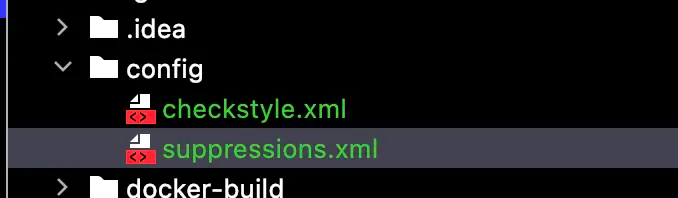
maven-lint-checkstyle-config

结束

最后就可以通过mvn checkstyle:check来检查您的工程啦。如果有违反了checkstyle的地方,命令行会提示出错的地方和违反的规则,如下图所示

maven-lint-checkstyle-fail1

maven-lint-checkstyle-fail2

附录

规则配置文件举例

1
2
3
4
5
6
7
8
9
10
11
12
13
14
15
16
17
18
19
20
21
22
23
24
25
26
27
28
29
30
31
32
33
34
35
36
37
38
39
40
41
42
43
44
45
46
47
48
49
50
51
52
53
54
55
56
57
58
59
60
61
62
63
64
65
66
67
68
69
70
71
72
73
74
75
76
77
78
79
80
81
82
83
84
85
86
87
88
89
90
91
92
93
94
95
96
97
98
99
100
101
102
103
104
105
106
107
108
109
110
111
112
113
114
115
116
117
118
119
120
121
122
123
124
125
126
127
128
129
130
131
132
133
134
135
136
137
138
139
140
141
142
143
144
145
146
147
148
149
150
151
152
153
154
155
156
157
158
159
160
161
162
163
164
165
166
167
168
169
170
171
172
173
174
175
176
177
178
179
180
181
182
183
184
185
186
187
188
189
190
191
192
193
194
195
196
197
198
199
200
201
202
203
204
205
206
207
208
209
210
211
212
213
214
215
216
217
218
219
220
221
222
223
224
225
226
227
228
229
230
231
232
233
234
235
236
237
238
239
240
241
242
243
244
245
246
247
248
249
250
251
252
253
254
255
256
257
258
259
260
261
262
263
264
265
266
267
268
269
270
271
272
273
274
275
276
277
278
279
280
281
282
283
284
285
286
287
288
289
290
291
292
293
294
295
296
297
298
299
300
301
302
303
304
305
306
307
308
309
310
311
312
313
314
315
316
317
318
319
320
321
322
323
324
325
326
327
328
329
330
331
332
333
<?xml version="1.0" encoding="UTF-8"?>
<!DOCTYPE module PUBLIC
"-//Puppy Crawl//DTD Check Configuration 1.3//EN"
"https://checkstyle.org/dtds/configuration_1_3.dtd">

<!-- This is a checkstyle configuration file. For descriptions of
what the following rules do, please see the checkstyle configuration
page at http://checkstyle.sourceforge.net/config.html -->
<module name="Checker">
<module name="FileTabCharacter">
<!-- Checks that there are no tab characters in the file. -->
</module>

<!-- All Java AST specific tests live under TreeWalker module. -->
<module name="TreeWalker">

<module name="SuppressionCommentFilter">
<property name="offCommentFormat" value="CHECKSTYLE.OFF\: ([\w\|]+)"/>
<property name="onCommentFormat" value="CHECKSTYLE.ON\: ([\w\|]+)"/>
<property name="checkFormat" value="$1"/>
</module>

<module name="SuppressWarningsHolder" />

<!--

IMPORT CHECKS

-->

<module name="RedundantImport">
<!-- Checks for redundant import statements. -->
<property name="severity" value="error"/>
<message key="import.redundancy"
value="Redundant import {0}."/>
</module>

<module name="AvoidStarImport">
<property name="severity" value="error"/>
</module>

<module name="RedundantModifier">
<!-- Checks for redundant modifiers on various symbol definitions.
See: http://checkstyle.sourceforge.net/config_modifier.html#RedundantModifier
-->
<property name="tokens" value="METHOD_DEF, VARIABLE_DEF, ANNOTATION_FIELD_DEF, INTERFACE_DEF, CLASS_DEF, ENUM_DEF"/>
</module>

<!--
IllegalImport cannot blacklist classes, and c.g.api.client.util is used for some shaded
code and some useful code. So we need to fall back to Regexp.
-->
<module name="RegexpSinglelineJava">
<property name="format" value="com\.google\.api\.client\.util\.(ByteStreams|Charsets|Collections2|Joiner|Lists|Maps|Objects|Preconditions|Sets|Strings|Throwables)"/>
</module>

<!--
Require static importing from Preconditions.
-->
<module name="RegexpSinglelineJava">
<property name="format" value="^import com.google.common.base.Preconditions;$"/>
<property name="message" value="Static import functions from Guava Preconditions"/>
</module>

<module name="UnusedImports">
<property name="severity" value="error"/>
<property name="processJavadoc" value="true"/>
<message key="import.unused"
value="Unused import: {0}."/>
</module>

<!--

JAVADOC CHECKS

-->

<!-- Checks for Javadoc comments. -->
<!-- See http://checkstyle.sf.net/config_javadoc.html -->
<module name="JavadocMethod">
<property name="scope" value="protected"/>
<property name="severity" value="error"/>
<property name="allowMissingParamTags" value="true"/>
<property name="allowMissingReturnTag" value="true"/>
</module>

<!-- Check that paragraph tags are used correctly in Javadoc. -->
<!-- <module name="JavadocParagraph"/>-->

<module name="JavadocType">
<property name="scope" value="protected"/>
<property name="severity" value="error"/>
<property name="allowMissingParamTags" value="true"/>
</module>

<module name="JavadocStyle">
<property name="severity" value="error"/>
<property name="checkHtml" value="true"/>
</module>

<!--

NAMING CHECKS

-->

<!-- Item 38 - Adhere to generally accepted naming conventions -->

<module name="PackageName">
<!-- Validates identifiers for package names against the
supplied expression. -->
<!-- Here the default checkstyle rule restricts package name parts to
seven characters, this is not in line with common practice at Google.
-->
<property name="format" value="^[a-z]+(\.[a-z][a-z0-9]{1,})*$"/>
<property name="severity" value="error"/>
</module>

<module name="TypeNameCheck">
<!-- Validates static, final fields against the
expression "^[A-Z][a-zA-Z0-9]*$". -->
<metadata name="altname" value="TypeName"/>
<property name="severity" value="error"/>
</module>

<module name="ConstantNameCheck">
<!-- Validates non-private, static, final fields against the supplied
public/package final fields "^[A-Z][A-Z0-9]*(_[A-Z0-9]+)*$". -->
<metadata name="altname" value="ConstantName"/>
<property name="applyToPublic" value="true"/>
<property name="applyToProtected" value="true"/>
<property name="applyToPackage" value="true"/>
<property name="applyToPrivate" value="false"/>
<property name="format" value="^([A-Z][A-Za-z0-9_]*|FLAG_.*)$"/>
<message key="name.invalidPattern"
value="Variable ''{0}'' should be in ALL_CAPS (if it is a constant) or be private (otherwise)."/>
<property name="severity" value="error"/>
</module>

<module name="StaticVariableNameCheck">
<!-- Validates static, non-final fields against the supplied
expression "^[a-z][a-zA-Z0-9]*_?$". -->
<metadata name="altname" value="StaticVariableName"/>
<property name="applyToPublic" value="true"/>
<property name="applyToProtected" value="true"/>
<property name="applyToPackage" value="true"/>
<property name="applyToPrivate" value="true"/>
<property name="format" value="^[a-z][a-zA-Z0-9]*_?$"/>
<property name="severity" value="error"/>
</module>

<module name="MemberNameCheck">
<!-- Validates non-static members against the supplied expression. -->
<metadata name="altname" value="MemberName"/>
<property name="applyToPublic" value="true"/>
<property name="applyToProtected" value="true"/>
<property name="applyToPackage" value="true"/>
<property name="applyToPrivate" value="true"/>
<property name="format" value="^[a-z][a-zA-Z0-9]*$"/>
<property name="severity" value="error"/>
</module>

<module name="MethodNameCheck">
<!-- Validates identifiers for method names. -->
<metadata name="altname" value="MethodName"/>
<property name="format" value="(^[a-z][a-zA-Z0-9]*(_[a-zA-Z0-9]+)*$|Void)"/>
<property name="severity" value="error"/>
</module>

<module name="ParameterName">
<!-- Validates identifiers for method parameters against the
expression "^[a-z][a-zA-Z0-9]*$". -->
<property name="severity" value="error"/>
</module>

<module name="LocalFinalVariableName">
<!-- Validates identifiers for local final variables against the
expression "^[a-z][a-zA-Z0-9]*$". -->
<property name="severity" value="error"/>
</module>

<module name="LocalVariableName">
<!-- Validates identifiers for local variables against the
expression "^[a-z][a-zA-Z0-9]*$". -->
<property name="severity" value="error"/>
</module>

<!-- Type parameters must be either one of the four blessed letters
T, K, V, W, X or else be capital-case terminated with a T,
such as MyGenericParameterT -->
<module name="ClassTypeParameterName">
<property name="format" value="^(((T|K|V|W|X|R)[0-9]*)|([A-Z][a-z][a-zA-Z]*))$"/>
<property name="severity" value="error"/>
</module>

<module name="MethodTypeParameterName">
<property name="format" value="^(((T|K|V|W|X|R)[0-9]*)|([A-Z][a-z][a-zA-Z]*T))$"/>
<property name="severity" value="error"/>
</module>

<module name="InterfaceTypeParameterName">
<property name="format" value="^(((T|K|V|W|X|R)[0-9]*)|([A-Z][a-z][a-zA-Z]*T))$"/>
<property name="severity" value="error"/>
</module>

<module name="LeftCurly">
<!-- Checks for placement of the left curly brace ('{'). -->
<property name="severity" value="error"/>
</module>

<module name="RightCurly">
<!-- Checks right curlies on CATCH, ELSE, and TRY blocks are on
the same line. e.g., the following example is fine:
<pre>
if {
...
} else
</pre>
-->
<!-- This next example is not fine:
<pre>
if {
...
}
else
</pre>
-->
<property name="option" value="same"/>
<property name="severity" value="error"/>
</module>

<!-- Checks for braces around if and else blocks -->
<module name="NeedBraces">
<property name="severity" value="error"/>
<property name="tokens" value="LITERAL_IF, LITERAL_ELSE, LITERAL_FOR, LITERAL_WHILE, LITERAL_DO"/>
</module>

<module name="UpperEll">
<!-- Checks that long constants are defined with an upper ell.-->
<property name="severity" value="error"/>
</module>

<module name="FallThrough">
<!-- Warn about falling through to the next case statement. Similar to
javac -Xlint:fallthrough, but the check is suppressed if a single-line comment
on the last non-blank line preceding the fallen-into case contains 'fall through' (or
some other variants that we don't publicized to promote consistency).
-->
<property name="reliefPattern"
value="fall through|Fall through|fallthru|Fallthru|falls through|Falls through|fallthrough|Fallthrough|No break|NO break|no break|continue on"/>
<property name="severity" value="error"/>
</module>

<!-- Checks for over-complicated boolean expressions. -->
<module name="SimplifyBooleanExpression"/>

<!-- Detects empty statements (standalone ";" semicolon). -->
<module name="EmptyStatement"/>

<!--

WHITESPACE CHECKS

-->

<module name="WhitespaceAround">
<!-- Checks that various tokens are surrounded by whitespace.
This includes most binary operators and keywords followed
by regular or curly braces.
-->
<property name="tokens" value="ASSIGN, BAND, BAND_ASSIGN, BOR,
BOR_ASSIGN, BSR, BSR_ASSIGN, BXOR, BXOR_ASSIGN, COLON, DIV, DIV_ASSIGN,
EQUAL, GE, GT, LAND, LE, LITERAL_CATCH, LITERAL_DO, LITERAL_ELSE,
LITERAL_FINALLY, LITERAL_FOR, LITERAL_IF, LITERAL_RETURN,
LITERAL_SYNCHRONIZED, LITERAL_TRY, LITERAL_WHILE, LOR, LT, MINUS,
MINUS_ASSIGN, MOD, MOD_ASSIGN, NOT_EQUAL, PLUS, PLUS_ASSIGN, QUESTION,
SL, SL_ASSIGN, SR_ASSIGN, STAR, STAR_ASSIGN"/>
<property name="severity" value="error"/>
</module>

<module name="WhitespaceAfter">
<!-- Checks that commas, semicolons and typecasts are followed by
whitespace.
-->
<property name="tokens" value="COMMA, SEMI, TYPECAST"/>
</module>

<module name="NoWhitespaceAfter">
<!-- Checks that there is no whitespace after various unary operators.
Linebreaks are allowed.
-->
<property name="tokens" value="BNOT, DEC, DOT, INC, LNOT, UNARY_MINUS,
UNARY_PLUS"/>
<property name="allowLineBreaks" value="true"/>
<property name="severity" value="error"/>
</module>

<module name="NoWhitespaceBefore">
<!-- Checks that there is no whitespace before various unary operators.
Linebreaks are allowed.
-->
<property name="tokens" value="SEMI, DOT, POST_DEC, POST_INC"/>
<property name="allowLineBreaks" value="true"/>
<property name="severity" value="error"/>
</module>

<module name="OperatorWrap">
<!-- Checks that operators like + and ? appear at newlines rather than
at the end of the previous line.
-->
<property name="option" value="NL"/>
<property name="tokens" value="BAND, BOR, BSR, BXOR, DIV, EQUAL,
GE, GT, LAND, LE, LITERAL_INSTANCEOF, LOR, LT, MINUS, MOD,
NOT_EQUAL, PLUS, QUESTION, SL, SR, STAR "/>
</module>

<module name="OperatorWrap">
<!-- Checks that assignment operators are at the end of the line. -->
<property name="option" value="eol"/>
<property name="tokens" value="ASSIGN"/>
</module>

<module name="ParenPad">
<!-- Checks that there is no whitespace before close parens or after
open parens.
-->
<property name="severity" value="error"/>
</module>

<module name="ModifierOrder"/>

</module>
</module>

屏蔽规则配置文件举例

1
2
3
4
5
6
7
8
9
10
11
<?xml version="1.0"?>
<!DOCTYPE suppressions PUBLIC
"-//Puppy Crawl//DTD Suppressions 1.1//EN"
"https://checkstyle.org/dtds/configuration_1_3.dtd">

<suppressions>
<!-- suppress all checks in the generated directories -->
<suppress checks=".*" files=".+[\\/]generated[\\/].+\.java"/>
<suppress checks=".*" files=".+[\\/]generated-sources[\\/].+\.java"/>
<suppress checks=".*" files=".+[\\/]generated-test-sources[\\/].+\.java"/>
</suppressions>

maven dependency-check

引入dependnecy-check插件

项目中原有的依赖是这样的

1
2
3
4
5
<dependency>
<groupId>io.netty</groupId>
<artifactId>netty-all</artifactId>
<version>4.1.41.Final</version>
</dependency>
1
2
3
4
5
6
7
8
9
10
11
12
13
14
15
16
17
18
19
20
21
22
23
24
25
26
27
28
29
30
31
<plugin>
<groupId>org.owasp</groupId>
<artifactId>dependency-check-maven</artifactId>
<version>${dependency-check-maven.version}</version>
<configuration>
<suppressionFiles>
<suppressionFile>src/owasp-dependency-check-suppressions.xml</suppressionFile>
</suppressionFiles>
<failBuildOnCVSS>7</failBuildOnCVSS>
<msbuildAnalyzerEnabled>false</msbuildAnalyzerEnabled>
<nodeAnalyzerEnabled>false</nodeAnalyzerEnabled>
<yarnAuditAnalyzerEnabled>false</yarnAuditAnalyzerEnabled>
<pyDistributionAnalyzerEnabled>false</pyDistributionAnalyzerEnabled>
<pyPackageAnalyzerEnabled>false</pyPackageAnalyzerEnabled>
<pipAnalyzerEnabled>false</pipAnalyzerEnabled>
<pipfileAnalyzerEnabled>false</pipfileAnalyzerEnabled>
<retireJsAnalyzerEnabled>false</retireJsAnalyzerEnabled>
<msbuildAnalyzerEnabled>false</msbuildAnalyzerEnabled>
<mixAuditAnalyzerEnabled>false</mixAuditAnalyzerEnabled>
<nugetconfAnalyzerEnabled>false</nugetconfAnalyzerEnabled>
<assemblyAnalyzerEnabled>false</assemblyAnalyzerEnabled>
<skipSystemScope>true</skipSystemScope>
</configuration>
<executions>
<execution>
<goals>
<goal>aggregate</goal>
</goals>
</execution>
</executions>
</plugin>

然后可以通过mvn clean install verify -DskipTests来检测。这个demo下,会输出

1
2
3
4
5
[ERROR] One or more dependencies were identified with vulnerabilities that have a CVSS score greater than or equal to '7.0': 
[ERROR]
[ERROR] netty-all-4.1.41.Final.jar: CVE-2019-16869(7.5), CVE-2021-37136(7.5), CVE-2020-11612(7.5), CVE-2021-37137(7.5), CVE-2019-20445(9.1), CVE-2019-20444(9.1), CVE-2020-7238(7.5)
[ERROR]
[ERROR] See the dependency-check report for more details.

实际使用时,由于dependency-check检查相对耗时,一般通过单独的profile来控制开关

屏蔽CVE漏洞

如果出现dependency-check误报或者是评估该漏洞不涉及,可以通过supression file来屏蔽

屏蔽单一CVE漏洞

1
2
3
4
5
6
7
<suppress>
<notes><![CDATA[
file name: zookeeper-prometheus-metrics-3.8.0.jar
]]></notes>
<sha1>849e8ece2845cb0185d721233906d487a7f1e4cf</sha1>
<cve>CVE-2021-29425</cve>
</suppress>

通过文件正则来屏蔽CVE漏洞

1
2
3
4
5
<suppress>
<notes>CVE-2011-1797 FP, see https://github.com/jeremylong/DependencyCheck/issues/4154</notes>
<filePath regex="true">.*netty-tcnative-boringssl-static.*\.jar</filePath>
<cve>CVE-2011-1797g</cve>
</suppress>

本文的代码已上传到github

交互式shell常用在输入密码的场景,为了防止密码泄露在cmdline中被ps -ef读取

举个🌰

1
2
3
4
#!/bin/bash

read -s -p "Enter Password: " pwd
echo -e "\nYour password is: " $pwd

go调用交互式shell代码样例如下

1
2
3
4
5
6
7
8
9
10
11
12
13
14
15
16
17
18
19
20
21
func TestCallInteractiveShell(t *testing.T) {
dir, err := os.Getwd()
if err != nil {
panic(err)
}
cmd := exec.Command("/bin/bash", dir+"/interactive_shell.sh")
var stdout, stderr bytes.Buffer
cmd.Stdout = &stdout
cmd.Stderr = &stderr
buffer := bytes.Buffer{}
buffer.Write([]byte("ZhangJian"))
cmd.Stdin = &buffer
err = cmd.Run()
if err != nil {
panic(err)
}
outStr, errStr := string(stdout.Bytes()), string(stderr.Bytes())
fmt.Println("output is ", outStr)
fmt.Println("err output is ", errStr)
fmt.Println("Execute Over")
}

输出结果

1
2
3
4
5
6
7
=== RUN   TestCallInteractiveShell
output is Your password is: ZhangJian

err output is
Execute Over
--- PASS: TestCallInteractiveShell (0.00s)
PASS

Java系的TLS一般都会要这么几个参数

  • client.keystore
  • client.truststore
  • client.password
  • server.keystore
  • server.truststore
  • server.password

生成证书

1
2
3
4
5
6
7
8
9
10
11
12
13
14
15
16
17
18
client_pass=zk_client_pwd
server_pass=zk_server_pwd
server_dname="C=CN,ST=GD,L=SZ,O=sh,OU=sh,CN=hezhangjian"
client_dname="C=CN,ST=GD,L=SZ,O=sh,OU=sh,CN=hezhangjian"
echo "generate client keystore"
keytool -genkeypair -keypass $client_pass -storepass $client_pass -dname $client_dname -keyalg RSA -keysize 2048 -validity 3650 -keystore zk_client_key.jks
echo "generate server keystore"
keytool -genkeypair -keypass $server_pass -storepass $server_pass -dname $server_dname -keyalg RSA -keysize 2048 -validity 3650 -keystore zk_server_key.jks
echo "export server certificate"
keytool -exportcert -keystore zk_server_key.jks -file server.cer -storepass $server_pass
echo "export client certificate"
keytool -exportcert -keystore zk_client_key.jks -file client.cer -storepass $client_pass
echo "add server cert to client trust keystore"
keytool -importcert -keystore zk_client_trust.jks -file server.cer -storepass $client_pass -noprompt
echo "add client cert to server trust keystore"
keytool -importcert -keystore zk_server_trust.jks -file client.cer -storepass $server_pass -noprompt
rm -f server.cer
rm -f client.cer

添加ZooKeeper配置

1
secureClientPort=2182

服务端启动

1
2
3
4
5
6
7
export SERVER_JVMFLAGS="
-Dzookeeper.serverCnxnFactory=org.apache.zookeeper.server.NettyServerCnxnFactory
-Dzookeeper.ssl.keyStore.location=$CERT_DIR/zk_server_key.jks
-Dzookeeper.ssl.keyStore.password=zk_server_pwd
-Dzookeeper.ssl.trustStore.location=$CERT_DIR/zk_server_trust.jks
-Dzookeeper.ssl.trustStore.password=zk_server_pwd"
/bin/bash $ZOOKEEPER_HOME/bin/zkServer.sh start

客户端启动

1
2
3
4
5
6
7
8
9
export CLIENT_JVMFLAGS="
-Dzookeeper.clientCnxnSocket=org.apache.zookeeper.ClientCnxnSocketNetty
-Dzookeeper.client.secure=true
-Dzookeeper.ssl.hostnameVerification=false
-Dzookeeper.ssl.keyStore.location=$CERT_DIR/zk_client_key.jks
-Dzookeeper.ssl.keyStore.password=zk_client_pwd
-Dzookeeper.ssl.trustStore.location=$CERT_DIR/zk_client_trust.jks
-Dzookeeper.ssl.trustStore.password=zk_client_pwd"
bin/zkCli.sh -server localhost:2182

启动成功

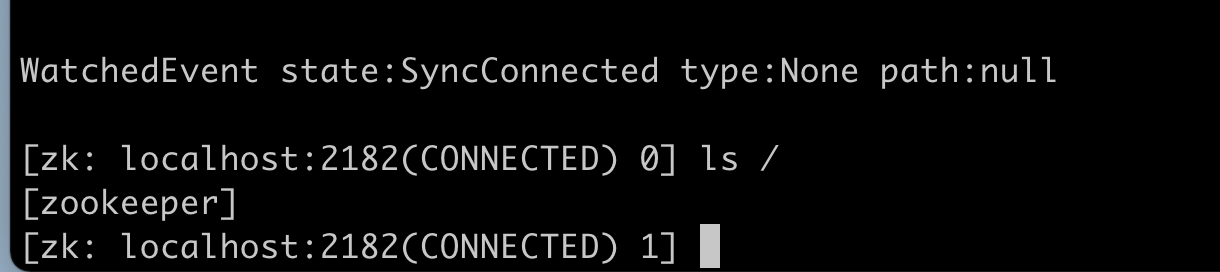
image-20211129182141882

这些天,在给项目servicecomb提交代码,升级其中的vertxnetty版本号,发现有单元测试用例跑不过

https://github.com/apache/servicecomb-java-chassis/pull/2614

1
2
3
4
5
6
@Test
public void testGetMaxFormAttributeSize() {
Assert.assertEquals(8192, TransportConfig.getMaxFormAttributeSize());
ArchaiusUtils.setProperty("servicecomb.rest.server.maxFormAttributeSize", 3072);
Assert.assertEquals(3072, TransportConfig.getMaxFormAttributeSize());
}

通过这个用例可以拦截,如果新版本TransportConfig中依赖的底层默认值修改为非8192的问题。

对于底层依赖的其他项目,有些参数有统一的文件放置,甚至有些项目,参数分散在各个文件。相比升级后,逐个参数检查,通过单元测试能更有效的发现默认值的变化或移动再处理。我觉得这是一个很好的实践。推广到非library库中,我们维护的pulsar、mysql等组件,也可以通过ut测试来保证一些配置文件中的默认参数没有新增、删除或修改。

这是近期观摩某个产品安全加固时的心得,也请教过我们部门的安全专家、架构师。第一篇文章,我想先分析一下重要性和我心中的实现原则。后面可以贴出一些更详细的流程和代码样例

早期没有做好安全,后果很严重

李林峰老师,也就是《Netty权威指南》的作者,同样也在华为工作 :)
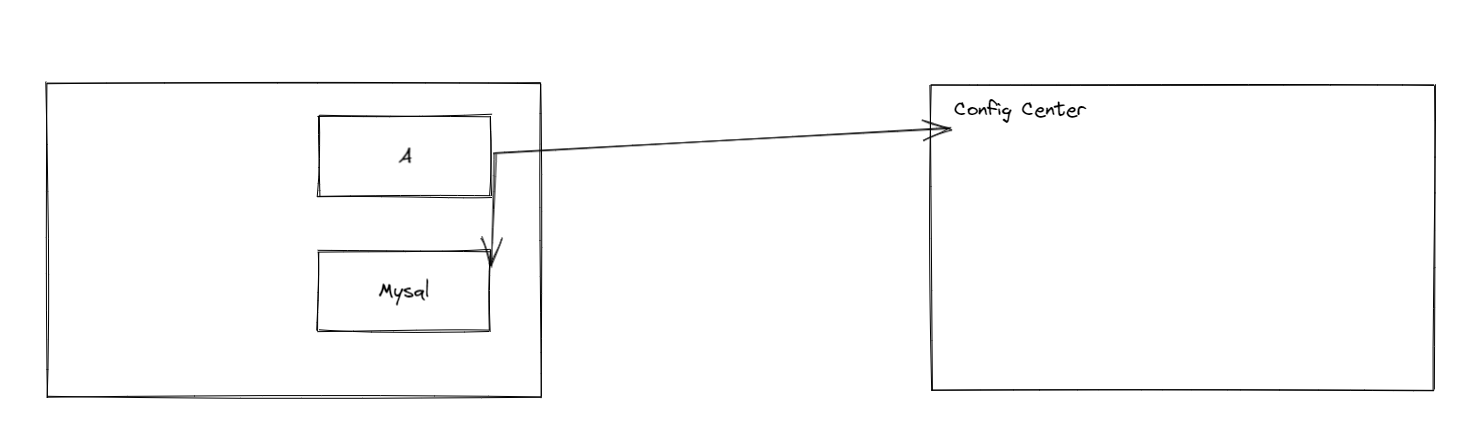
。在一本书就曾写过,见过很多产品在安全审核上投入了大量的时间和精力。我表示深深地认同。而这些,往往是因为产品在初期没有做好好的安全设计。以一个假想产品举例,

image-20211031152752639

图中,A与B之间,A与配置中心之前,都存在放置敏感信息的可能。有意思的事情来了,当安全分析发现了A与B之前存在放置敏感信息的可能时,产品决定把A与Mysql之间的通信进行加密和认证,加密的源材料放在哪?决策放到配置中心。可是,当安全分析发现A与配置中心之间存在传递敏感信息的可能时?那产品又应该怎么做?总不能放在Mysql这里吧。

由此可见,如果没有一个完善的从上而下的安全设计,产品在搞安全增强或者说加固的时候,就像哪里破了刷哪里一样,把房间弄得乱七八糟,事倍功半。我相信更难受的是那些刷墙的开发人员。

自上而下安全设计的核心

作为一个开发人员,我还是站在开发人员的角度。我认为对于开发人员的核心就是有一个 证书可轮换、密钥可轮换的基础机制。毕竟开发人员最常碰到的安全问题就是:

  • 通信中敏感数据没有加密
  • 通信中双方没有做认证
  • 敏感信息存储没有加密

拥有了证书可轮换、密钥可轮换的机制,开发人员就可以轻而易举地搞定这三件事情。

从设计、开发人员的思维、底层库开始,证书、密钥都是支持可替换的

  • 底层库支持证书轮换、密钥轮换,同时注意轮换时老密钥的存留时间等
  • 密钥更新时,如果需要彻底废弃老密钥,注意旧数据需要重新解密后用新密钥加密
  • 开发人员也要认同密钥是可替换的,甚至不同用户的密钥可以是不一样的,不然如果平时测试覆盖不到密钥替换,真正实施的话,就会不敢实施,或者出现现网事故

证书、密钥的存储

往往,我们开发的任意两个组件之间,都可能会要求互相通信和认证,更不用提那些初始口令了,肯定是需要加密的,所以证书和密钥不适合存在产品自己开发的配置中心,或者是数据库中。更适合在安装部署阶段放置在更底层,更基础设施中,例如

  • 专用的加密硬件
  • 依赖公有云进行部署的,可以将证书存放在云上托管的Kubernetes集群的secret中,并对k8s集群进行加固,避免根密钥、根证书泄露

这些都可以由部署工具自动导入或人工手动导入。

设计证书、密钥的使用轮换机制

  • 证书的粒度:是每个微服务一个证书还是每个业务场景一个证书
  • 密钥的粒度:是每个客户一个工作密钥还是共享一个工作密钥
  • 轮换时是否容忍业务损失,最大可损失时长是多久
  • 还要注意每个微服务能获取到的证书和密钥,它只应该获取它需要的证书、密钥,理论上单一微服务不应该有获取根证书、根密钥的能力。

Cassandra中的Key有如下三种类型

  • Primary Key
  • Partitioning Key
  • Clustering Key

Primary Key 主键

每张表都需要有主键。主键可以是一个字段或者多个字段的组合。每条记录的主键必须唯一。举个例子

1
2
3
4
5
6
7
8
9
10
11
12
CREATE TABLE player (
name text,
club text,
league text,
nationality text,
kit_number text,
position text,
goals int,
assists int,
appearences int,
PRIMARY KEY (club, league, name, kit_number, position, goals)
)

这个数据表的主键有多个字段,称做复合主键。

分区键

Cassandra根据分区键,使用一致性哈希算法,把数据分配到集群的各个机器上。一个机器可以包含多个分区。Cassandra保证同一分区键的数据都在一台机器上。通过合理的设置分区键,可以让你的查询让尽量少的机器处理,提升查询的效率

对于单主键字段来说,分区键和主键是同一个字段。

对于复合主键字段来说,默认情况下,分区键是复合主键的第一个字段。如上例中,分区键是club字段

可以通过括号来将分区键指定为多个字段,如将上面CQL的11行修改为

1
PRIMARY KEY ((name, club), league, kit_number, position, goals)

Clustering Key

Clustering Keys决定了分区内数据的排序。让我们再看一下最初的例子

1
2
3
4
5
6
7
8
9
10
11
12
CREATE TABLE player (
name text,
club text,
league text,
nationality text,
kit_number text,
position text,
goals int,
assists int,
appearences int,
PRIMARY KEY (club, league, name, kit_number, position, goals)
)

在主键中的字段,除了分区键外都是clustering key。既然club是主键,那么league name kit_number position goals是Clustering key。你可以定义clustering key中每个字段的升降序。可以将kit_number降序、goals升序

排序顺序与主键中字段的顺序相同。因此,在上面的例子中,数据是按照如下布局的

  • 所有相同club的运动员都将分在同一个分区
  • 在分区内,按照leauge排序
  • 然后按照name排序
  • 然后按照kit_number排序

定义不同字段升降序的语法如下(默认为升序)

1
2
3
4
5
6
7
8
9
10
11
12
13
CREATE TABLE player (
name text,
club text,
league text,
nationality text,
kit_number text,
position text,
goals int,
assists int,
appearances int,
PRIMARY KEY (club, league, name, kit_number, position, goals)
)
WITH CLUSTERING ORDER BY (league ASC, name DESC, kit_number ASC, position DESC );

准备被测程序

通过-g编译程序来携带debug信息,这样子输出的错误信息就可以包含精确的行号。如果你可以承受程序运行缓慢,那么我们可以使用-O0来编译程序。如果使用-O1,那么输出的行号可能会不准确。不推荐使用-O2及以上,因为 valgrind memcheck 偶尔会报告不存在的未初始化值错误。

运行程序

如果平时这么运行

1
myprog arg1 arg2

就使用这个命令

1
valgrind --leak-check=yes myprog arg1 arg2

Memcheck是默认的valgrind工具,--leak-check打开了内存泄漏检测开关。

通过这个命令运行,大约会比平时运行慢20到30倍,并且使用更大的内存。Memcheck 将发出它检测到的内存错误和泄漏的信息。

解释memcheck的输出

使用样例的C程序,包含一个内存分配错误和内存溢出

1
2
3
4
5
6
7
8
9
10
11
12
13
#include <stdlib.h>

void f(void)
{
int* x = malloc(10 * sizeof(int));
x[10] = 0; // problem 1: heap block overrun
} // problem 2: memory leak -- x not freed

int main(void)
{
f();
return 0;
}

执行内存检测

1
2
gcc -g demo.c
valgrind ./a.out

输出信息如下

1
2
3
4
5
6
7
8
9
10
11
12
13
14
15
16
17
18
19
20
21
22
23
24
25
26
27
28
29
30
31
32
==145== Memcheck, a memory error detector
==145== Copyright (C) 2002-2017, and GNU GPL'd, by Julian Seward et al.
==145== Using Valgrind-3.17.0 and LibVEX; rerun with -h for copyright info
==145== Command: ./a.out
==145==
==145== Invalid write of size 4
==145== at 0x401144: f (demo.c:6)
==145== by 0x401155: main (demo.c:11)
==145== Address 0x4a27068 is 0 bytes after a block of size 40 alloc'd
==145== at 0x484086F: malloc (vg_replace_malloc.c:380)
==145== by 0x401137: f (demo.c:5)
==145== by 0x401155: main (demo.c:11)
==145==
==145==
==145== HEAP SUMMARY:
==145== in use at exit: 40 bytes in 1 blocks
==145== total heap usage: 1 allocs, 0 frees, 40 bytes allocated
==145==
==145== 40 bytes in 1 blocks are definitely lost in loss record 1 of 1
==145== at 0x484086F: malloc (vg_replace_malloc.c:380)
==145== by 0x401137: f (demo.c:5)
==145== by 0x401155: main (demo.c:11)
==145==
==145== LEAK SUMMARY:
==145== definitely lost: 40 bytes in 1 blocks
==145== indirectly lost: 0 bytes in 0 blocks
==145== possibly lost: 0 bytes in 0 blocks
==145== still reachable: 0 bytes in 0 blocks
==145== suppressed: 0 bytes in 0 blocks
==145==
==145== For lists of detected and suppressed errors, rerun with: -s
==145== ERROR SUMMARY: 2 errors from 2 contexts (suppressed: 0 from 0)
  • 145 是进程号
  • 输出的第一行,即上方的第六行(Invalid write)表明了错误的类型。这里程序往不归它拥有的内存中写入了信息
  • 下方是错误的堆栈信息
  • 代码地址如0x401155通常并不重要,但有时候定位奇怪的问题可能会很关键
  • 一些错误信息会有第二段,用来描述所涉及的内存地址。上例指出写入的内存刚好超过 example.c 的第 5 行使用 malloc() 分配的块的末尾。

内存泄漏信息

1
2
3
4
==145== 40 bytes in 1 blocks are definitely lost in loss record 1 of 1
==145== at 0x484086F: malloc (vg_replace_malloc.c:380)
==145== by 0x401137: f (demo.c:5)
==145== by 0x401155: main (demo.c:11)

堆栈可以表明什么内存泄露了,但memcheck并不能告诉你内存泄漏的原因

valgrind会提示两种内存泄漏

  • “definitely lost”: 绝对泄漏了内存,必须修复
  • “probably lost”: 程序可能泄漏了内存,也有可能是一些特定的指针操作(如:指针放到了堆中)

参考

https://www.valgrind.org/docs/manual/quick-start.html#quick-start.intro

https://www.valgrind.org/docs/manual/mc-manual.html#mc-manual.errormsgs

前提条件

添加配置

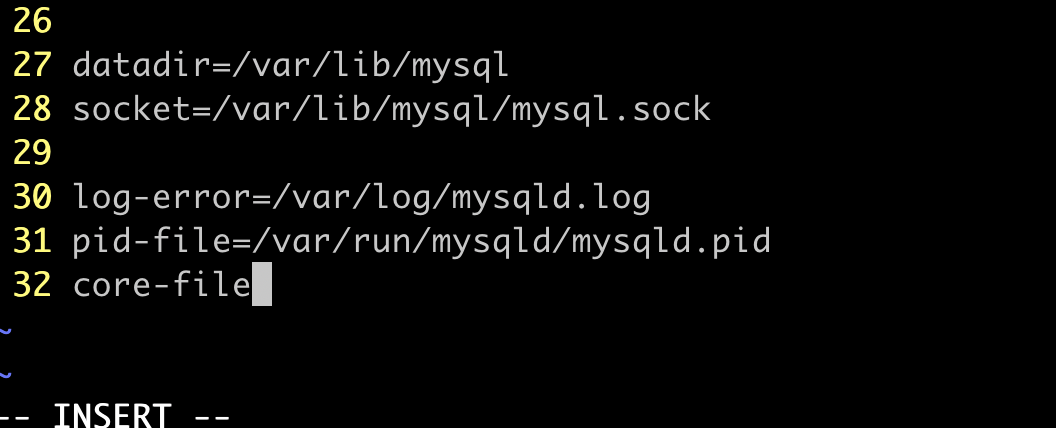
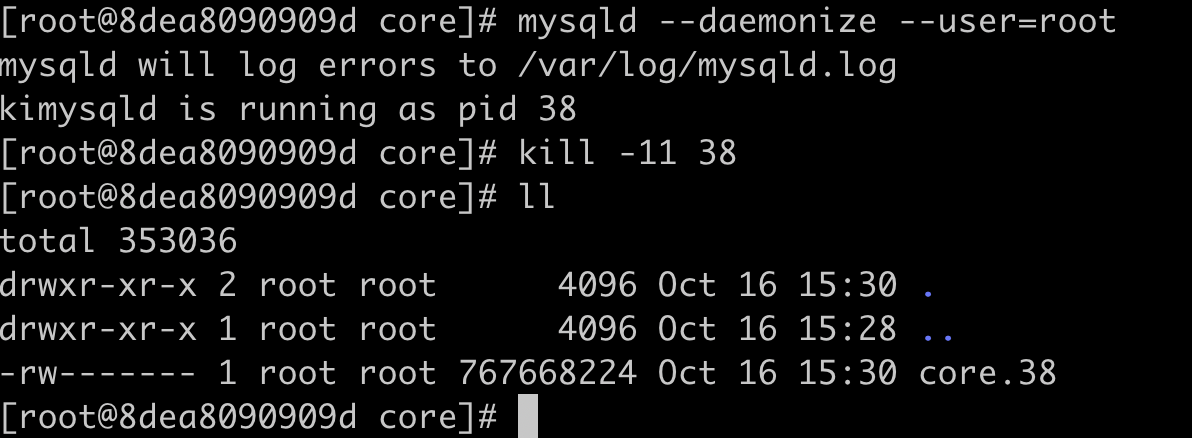
[mysqld]下面添加core-file

image-20211016232603862

ulimit打开core file限制

1
ulimit -c unlimited

如需要,修改core file路径(如在容器内,需要特权容器权限)

1
echo "/opt/sh/mysql/core/core" > /proc/sys/kernel/core_pattern

使得core file携带pid信息

1
echo 1 >/proc/sys/kernel/core_uses_pid

通过kill命令获取core file

1
kill -11 $pid

image-20211016233105059

将程序(以rust程序为例)托管为Systemd运行比较容易,步骤分为以下几步

  • 生成rust二进制文件
  • 创建专用用户和用户组(可省略)
  • 书写.service文件
  • 通过systemctl启动

接下来我们以ubuntu、简单的rust web程序为例,演示一个简单的rust程序如何托管给Systemd运行

生成rust二进制文件

添加依赖

1
2
tokio = { version = "1", features = ["full"] }
warp = "0.3"

书写简单代码

1
2
3
4
5
6
7
8
9
10
11
12
use warp::Filter;

#[tokio::main]
async fn main() {
// GET /hello/warp => 200 OK with body "Hello, warp!"
let hello = warp::path!("hello" / String)
.map(|name| format!("Hello, {}!", name));

warp::serve(hello)
.run(([127, 0, 0, 1], 3030))
.await;
}

编译生成二进制

cargo build --release

二进制就在target/release

创建专用用户和用户组

为了更细粒度地授权和文件权限控制,我们可以给守护程序创建专用的用户

1
sudo useradd vmproxy -s /sbin/nologin -M

书写.service文件

.service文件在ubuntu应该放到/lib/systemd/system/路径下。样例如下vm-proxy.service

1
2
3
4
5
6
7
8
9
10
11
12
13
14
15
16
17
18
19
20
21
22
23
24
25
26
27
28
[Unit]
Description=Vm Proxy
ConditionPathExists=/home/ubuntu/rust/vm-proxy/target/release/vm-proxy-rust
After=network.target

[Service]
Type=simple
User=vmproxy
Group=vmproxy
LimitNOFILE=1024

Restart=on-failure
RestartSec=10

WorkingDirectory=/home/ubuntu/rust/vm-proxy/target/release
ExecStart=/home/ubuntu/rust/vm-proxy/target/release/vm-proxy-rust

# make sure log directory exists and owned by syslog
PermissionsStartOnly=true
ExecStartPre=/bin/mkdir -p /var/log/vm-proxy
ExecStartPre=/bin/chown syslog:adm /var/log/vm-proxy
ExecStartPre=/bin/chmod 755 /var/log/vm-proxy
StandardOutput=syslog
StandardError=syslog
SyslogIdentifier=vm-proxy

[Install]
WantedBy=multi-user.target

ConditionPathExistsWorkingDirectoryExecStart 这三个参数需要根据自己的路径修改

通过Systemctl启动

1
2
sudo systemctl enable vm-proxy.service
sudo systemctl start vm-proxy.service

验证启动完成

image-20211012165631993

环境准备

需要有一个运行的java程序,如果你已经有了运行中的java程序,请跳过这一节,示例,我启动自制的kafka镜像

1
docker run ttbb/kafka:mate

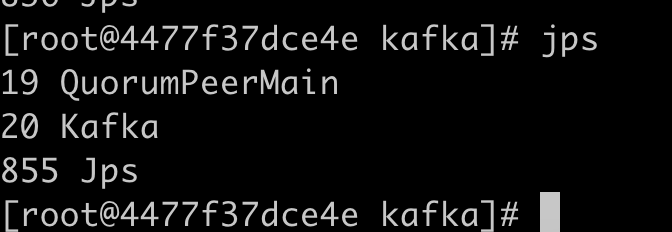
找到java程序的pid

ps -ef或者jps均可,其中jps需要安装jdk

image-20210929143232887

安装arthas

1
2
3
wget https://github.com/alibaba/arthas/releases/download/arthas-all-3.5.4/arthas-bin.zip
mkdir -p arthas
unzip arthas-bin.zip -d arthas

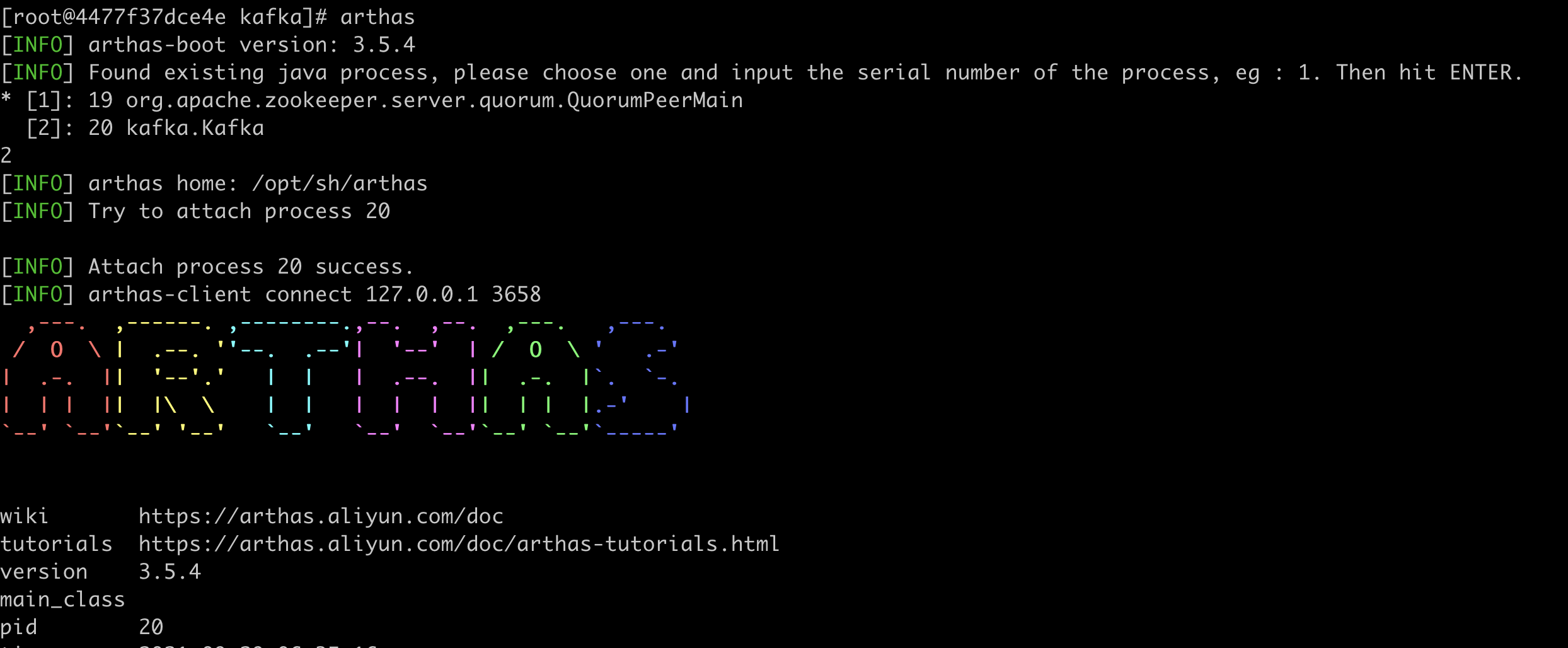
使用arthas连接到目标程序

image-20210929143537663

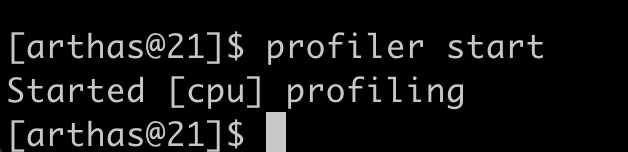
开始profiler

1
profiler start

如果出现Perf events unavailable. See stderr of the target process.如图所示

image-20210929143621015

需要在docker所在虚拟机上执行如下命令

1
2
echo 1 > /proc/sys/kernel/perf_event_paranoid
echo 0 > /proc/sys/kernel/kptr_restrict

如果是mac用户

1
docker run -it --privileged --pid=host debian nsenter -t 1 -m -u -n -i sh

执行上述命令进入docker所在的虚拟机操作即可

注意,在部分docker版本中,有可能还无法进行profiler采集,您可能需要以特权方式启动容器,不过,为了定位性能问题,这总是值得付出的,不是吗?

image-20210929151106090

等待profiler一段时间

一般等待一分钟即可

结束profiler

1
profiler stop

image-20210929151209352

结束

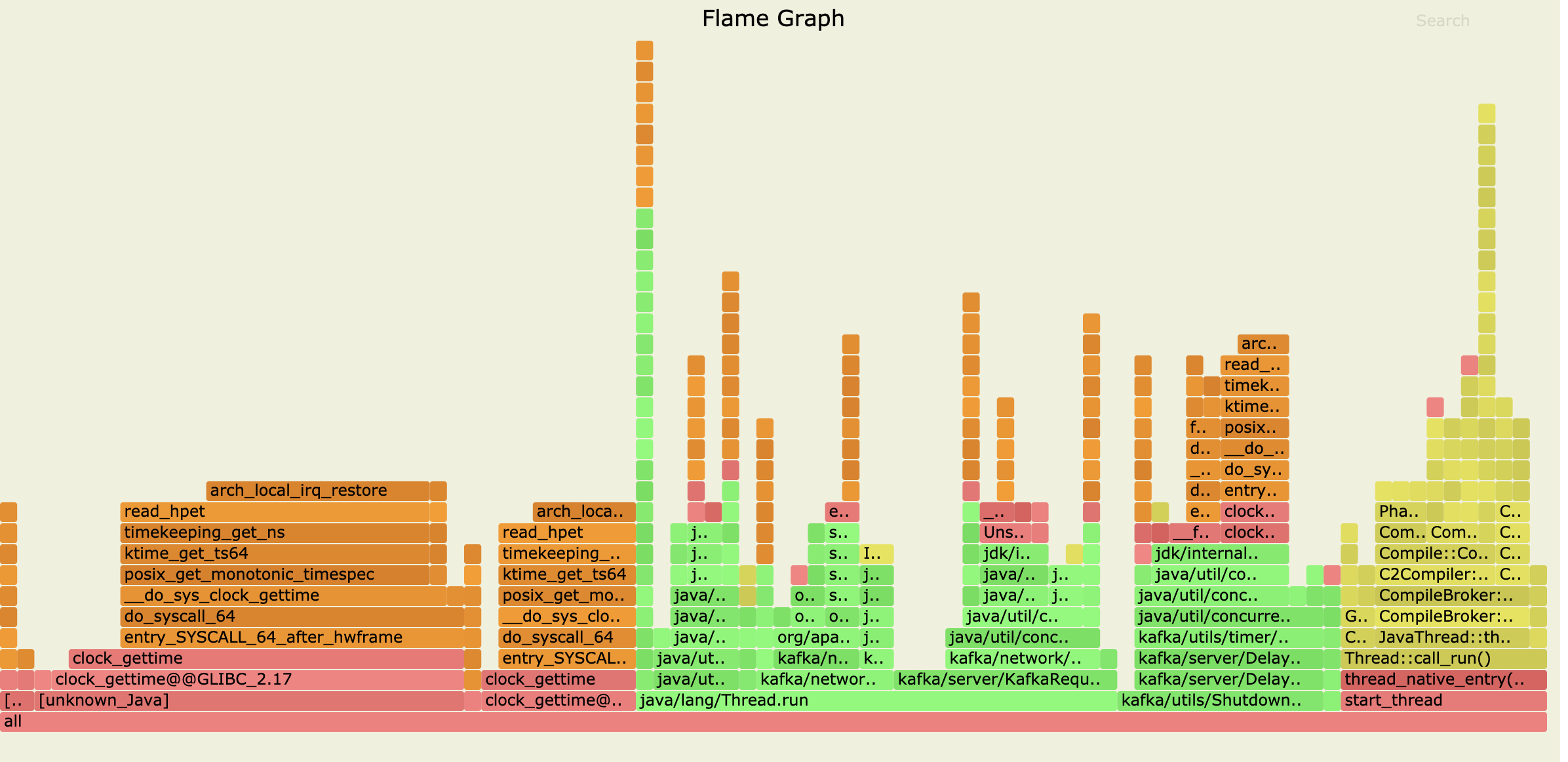
Congratulations,完成了火焰图的输出,现在你可以使用火焰图来分析执行时间较长的方法啦

image-20210929151506122

0%